



 Download VideoSolo Player For FREE!
Deciding on the best way to enjoy movies at home may turn out to be unexpectedly complicated. Because there is a great number of different formats, knowing the differences is very important, especially in the case of Blu-ray vs DVD. DVDs have been a family essential for years, but Blu-ray discs offer to bring you much more detail in pictures, better sound, and more storage space for your favorite movies. However, the question that arises is whether it is really the right decision to upgrade to Blu-ray? Here, we are going to take a thorough look at the features, performance, and price of both formats. We will also refer to the real scenarios and provide a method for you to play these discs without the issue of region locks. When reading this, you will be clear on which format fits your home entertainment requirements the most.

Part 1. Blu-ray vs. DVD: What are They
Before comparing performance, price, and real-world usage, it’s essential to understand what these two formats actually are. When discussing Blu-ray vs DVD, we’re essentially comparing two generations of optical disc technology designed to store and play digital video content.
What Is Blu-ray?
A Blu-ray Disc is a high-definition optical disc format introduced in 2006. It was designed to replace DVDs by offering higher video resolution and larger storage capacity. Blu-ray can hold more data than conventional DVDs because it employs a blue-violet laser to read and write data.
Today, Blu-ray discs are widely used for HD and 4K movies, gaming, and high-quality media distribution. When discussing Blu-ray discs vs DVD, Blu-ray represents the newer and more advanced generation of physical media. During the format competition era, the debate of Blu-ray disc vs HD DVD was also significant, but Blu-ray ultimately became the dominant HD disc format worldwide.

What is a DVD?
DVD (short for Digital Versatile Disc) is one of the earliest optical disc formats that was created for the distribution of movies and music. They emerged in the late 1990s, and within a short period, DVDs replaced VHS tapes as the most popular home video format. A red laser is used to read data, and video playback on these discs has been optimized for standard definition.
In fact, even though DVD is an older format than Blu-ray, the usage of DVDs has not disappeared entirely. This is because DVDs offer good value for money and are compatible with most players and computers. In other words, they are still the preferred choice when it comes to physical media, despite the fact that Blu-ray technology is a significant step forward.

Part 2. Blu-ray vs. DVD: Deep Analysis
Now that you understand what each format is, let’s take a closer look at the fundamental differences between them. This deep comparison of Blu-ray vs DVD will help you clearly see how they perform in everyday use.
1. Video Quality
One of the most significant differences between the two formats is video clarity.
- • DVD resolution: Typically 720×480 pixels (480p, Standard Definition)
- • Blu-ray resolution: 1920×1080 pixels (1080p, Full HD), and even 4K for Ultra HD Blu-ray
When discussing DVD resolution vs Blu-ray, Blu-ray delivers sharper images, better color accuracy, and more visible detail, especially on large TVs.
In terms of Blu-ray vs DVD quality, Blu-ray clearly provides a more immersive and cinematic viewing experience. At the same time, DVDs may appear softer or slightly pixelated on modern high-resolution screens.
2. Audio Quality
Additionally, Blu-ray has better audio quality than DVD.
- • DVD: Compatible with compressed audio formats, including DTS and Dolby Digital.
- • Blu-ray: is compatible with cutting-edge lossless formats such as HD Master Audio, Dolby TrueHD, and DTS.
Therefore, Blu-ray provides clearer voices, richer bass, and more detailed surround sound, the difference being very clear when you have a home theater system.
In overall Blu-ray vs DVD quality, the difference in audio becomes obvious for users who care about high-fidelity sound.
3. Storage Capacity
Storage has a major impact on the quality of video and audio, and also on the availability of the extra content.
- • DVD: 4.7GB (single, layer), 8.5GB (dual, layer)
- • Blu-ray: 25GB (single, layer), 50GB (dual, layer), and even 100GB+ for 4K UHD
Since Blu-ray can accommodate a lot more data, it is possible to save higher resolution video, superior audio, and more features without compression.
4. Price
DVDs are generally more affordable than Blu-ray discs.
- • DVDs typically cost less due to lower production costs.
- • Blu-ray discs are slightly more expensive because of their higher storage capacity and better quality.
However, the price difference is much less than it was in the past because Blu-ray players and discs have gotten much more affordable over time.
5. Use Scenarios
Your ideal format depends on how and where you watch movies:
DVD is suitable for:
- • Small TVs
- • Casual viewing
- • Budget-conscious users
- • Older DVD players
Blu-ray is suitable for:
- • Large HD or 4K TVs
- • Home theater systems
- • Movie collectors
- • Viewers who prioritize high-quality visuals and sound
Blu-ray is superior for high-end viewing experiences when compared to DVD quality, but DVDs are still useful for regular, affordable entertainment.
Part 3. Blu-ray vs. DVD: Who's Better After All
After a thorough comparison of video quality, sound performance, storage capacity, price, and usage, the ultimate question comes down to: which format is better? The straightforward answer is, really, it depends on what you want!
Should you opt for dazzling pictures, great-sounding music, and heaps of storage, Blu-ray would unquestionably be your choice. It gives you crisper images, more vibrant colors, and a higher level of sound detail. Thus is the best on a large TV and home theater system settings. Blu-ray is undoubtedly the right choice for movie buffs and collectors who desire a top-notch viewing experience.
Nevertheless, DVDs are still good for certain things. Whether you want to save money and get the cheapest format, have an older player, or mainly watch movies on small, sized screens, then DVD would be the most efficient, helpful, and easy, to, access solution. It is cheap, universally compatible, and still good enough for casual viewing.
In the Blu-ray vs. DVD showdown, clearly, Blu-ray takes the cake in overall performance and quality, whereas DVD scores points in affordability and compatibility.
Part 4. Extension: How to Play DVD and Blu-ray Discs [No Region Limits]
VideoSolo Blu-ray Player is an excellent player program that allows you to play Blu-ray discs, DVDs, ISO files, and folders without any problems on your Windows and Mac. It is different from regular hardware players as it helps to get around region restrictions, so you can watch discs from other countries without encountering compatibility problems. It delivers a playback performance at a high quality level while preserving the original video and audio quality, so it's a handy option for home users.
 Features
- Play Blu-ray discs (Region A, B, C) without restriction
- Full HD 1080p and high-quality audio output
- Customizable subtitles and audio tracks
- Smooth and stable playback performance
Steps to Play DVD and Blu-ray Discs
Step 1. Install VideoSolo Blu-ray Player on your Windows or Mac computer. Insert your DVD or Blu-ray disc into your computer’s disc drive or file.
Step 2. Launch VideoSolo Blu-ray Player and click Open Disc.
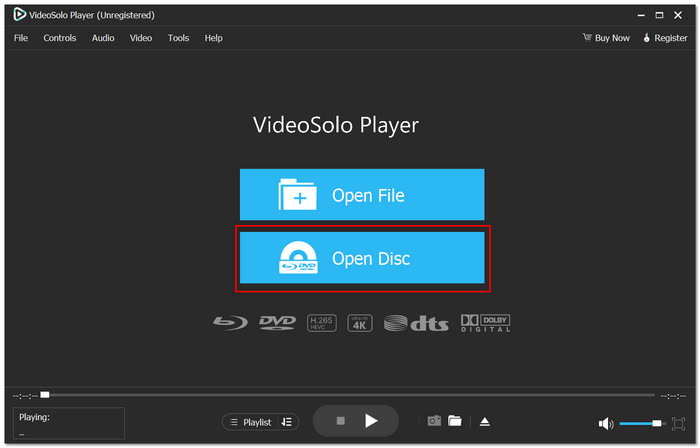
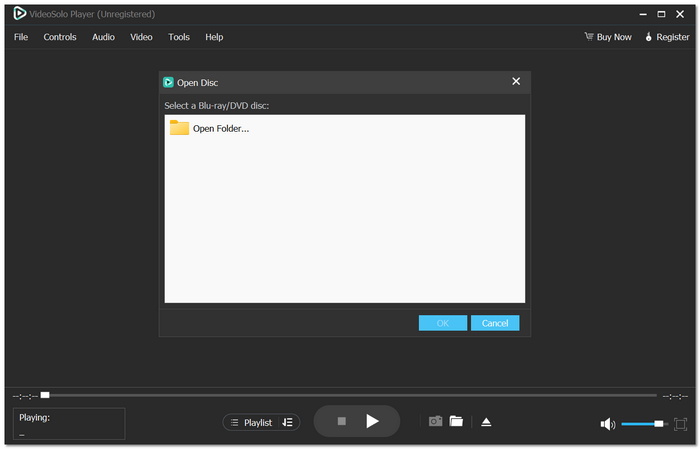
Step 3. Select your disc and click Play. The software will automatically bypass region restrictions and start playing your movie. You can adjust subtitles, audio tracks, screen size, and playback settings during viewing.
Using Experience
The truth is, VideoSolo Blu-ray Player gives you a very smooth playback performance with barely any buffering at all. The interface is neat and very user-friendly, so it is easy even for a first-time user. The video is very clear and detailed, and the sound is equally clear and engaging. Most importantly, there’s no need to worry about region codes anymore. Whether you imported a Blu-ray from another country or own DVDs from different regions, the software handles them seamlessly.
Conclusion
It should be very clear to you what the key differences between Blu-ray and DVD are, covering everything from video and audio quality to storage capacity, price, and where you might practically use them. Rather than figuring out which is the better format through trial and error, you are now able to decide confidently based on how you watch, how much you want to spend, and the kind of equipment you have. Essentially, the question of Blu-ray Disc vs DVD is a matter of performance versus convenience, and you are now perfectly aware of which one is the most suitable for you.
More Reading

Play your videos/music in 100+ formats and region-free DVDs/Blu-rays with 4K and Dolby Atmos experiences.

