



 Download VideoSolo Player For FREE!
I tried to figure out the truth before I started using the Leawo Blu-ray Player. I kept coming across totally different reviews. While some people say it’s a good free Blu-ray player, others mention very annoying restrictions. The thing is, it made me curious enough to try it out myself. So here I am, sharing my genuine hands-on experience with the product, its pros, cons, and whether it is really a good value for your time or money. I’ll guide you with the steps to work the software and also present you with a good alternative, allowing you to pick the most suitable Blu-ray player without spending hours on trial and error.
Part 1. What is Leawo Blu-ray Player
Leawo Blu-ray Player is a desktop media player that supports playing Blu-ray discs, DVDs, ISO files, and standard video formats on both Windows and Mac. On my first use, it impressed me that it ambitiously advertised itself as a free Leawo Blu-ray player. You are able to watch Blu-ray movies without giving any money upfront or installing additional codecs. It features HD playback, simple Blu-ray menu navigation, and region-free playback, thereby attracting users who merely wish to press play and watch. However, its presentation as a straightforward, free-charge tool contrasts with the fact that its performance and drawbacks become more evident when you use it regularly.
Part 2. Is Leawo Blu-ray Player Worth Buying
At first, I was curious if the Blu-ray player Leawo was truly a good free Blu-ray solution, as it was highly praised. After continuing to use it for some time, I have come to consider these points: what it does really well, the areas where it is weak, and if it is worth your attention.
 pros
pros
- Free to use without mandatory upgrades
- Plays Blu-ray, DVD, BDMV folders, and popular video formats
- Simple interface that’s easy to navigate
- Subtitle and audio track control for better viewing
 Cons
Cons
- Occasional ads or prompts to upgrade for extra features
- Limited advanced video/audio enhancements
- System performance can lag slightly with large UHD files
Using Experience
Based on my personal experience, I would say that the Leawo Blu-ray player is a good player for everyday playback of Blu-ray and videos, especially when all you want is a free video player to do the job. It pops discs open pretty fast and works with the formats without making a big deal of it. But if you are looking for things like stylish menus, better upscaling, or a wide range of play features, you are likely to come across its shortcomings. On the whole, it’s a decent freeware alternative, but not the top-tier Blu-ray software in the market.
Part 3. How to Use Leawo Blu-ray Player
Even if you aren’t knowledgeable about Blu-ray software, it's really simple to use Leawo Blu-ray Player 4K, which works wonders for any device. Follow this guide:
Step 1. Download the player for your Mac or Windows computer from the official Leawo website. Follow the instructions to complete the setup.
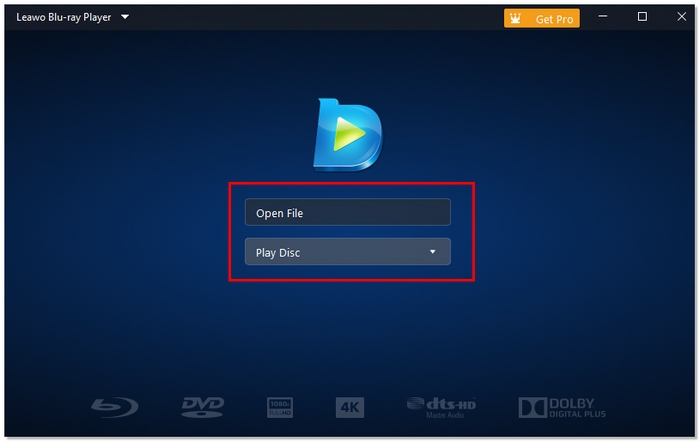
Step 2. Open the software and click Open File or Open Disc to select your Blu-ray disc, folder, or ISO file.
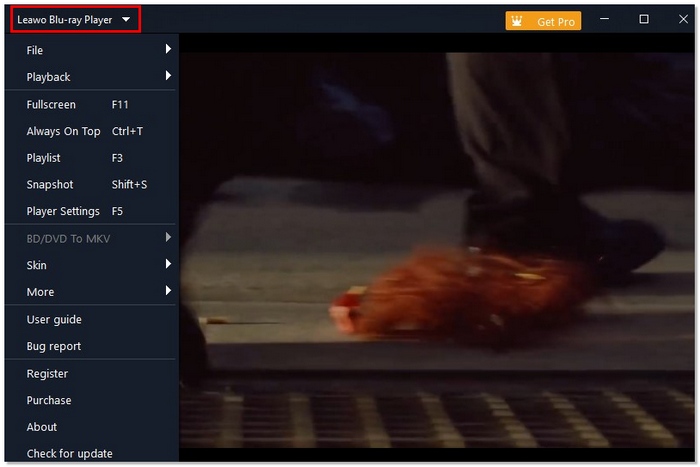
Step 3. Use the settings menu to tweak subtitles, audio tracks, and video preferences. You can also adjust screen size or toggle full-screen mode.
Step 4. The player will play automatically. You can play or pause the player if you want to.
Leawo Blu-ray Player 4K made the whole experience very easy and smooth. It handled even large 4K files without any delay, and changing the audio or subtitles was pretty simple too. It’s a good choice if you want to watch Blu-ray movies in high quality with no extra trouble.
Part 4. The Best Alternative for Leawo Blu-ray Player
If you have ever encountered issues with Leawo Blu-ray Player not working, then you are not the only one. Occasionally, the software may refuse to read discs, be unresponsive while playing, or have trouble with UHD files. Thus, I began searching for a trustworthy substitute, and VideoSolo Player was the one that most attracted me. It is an all-around media player that effortlessly plays Blu-ray, BDMV, ISO, and DVD files, including regular video formats.
 Features
- Supports Blu-ray, 4K UHD, DVDs, ISO files, and BDMV folders
- Smooth playback for UHD and HDR content
- Subtitle and audio track selection
- Snapshot feature to capture video frames
- Lightweight design, low system consumption
Steps to Use VideoSolo Player
Step 1. Once you download the software, follow the directions for installing it without a hitch. Launch VideoSolo Player and click either Open File or Open Disc to locate a video file.
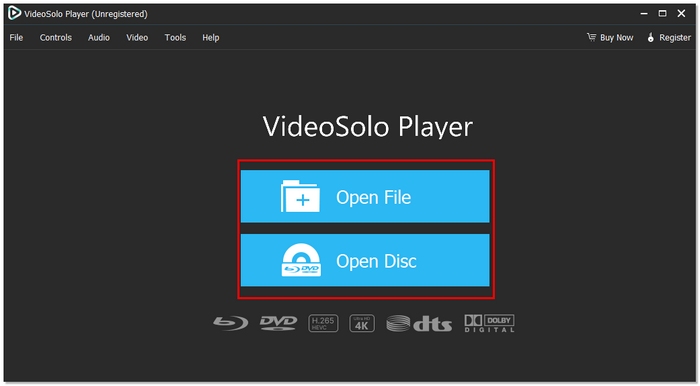
Step 2. You can choose audio tracks, subtitles, and the player’s screen size. After that, play to enjoy smooth UHD or Blu-ray content.

Using Experience
In my view, Leawo Blu-ray Player is occasionally backed up by VideoSolo Player. Very big UHD files are opened fast, the playback is smooth without any breaks, and the switching of subtitles or audio tracks is very smooth. It's a dependable alternative that not only resolves the usual problems of the Leawo player but also provides a refined, top-notch viewing experience.
Part 5. Leawo Blu-ray Player vs Its Alternative: Who’s Better
Choosing the perfect Blu-ray player is quite difficult. Especially when options like Leawo Blu-ray Player and VideoSolo Player are both able to deliver smooth playback and high-quality visuals, in this part, I am comparing these two on the key features such as types of supported media, resolution, speed, pricing, and usability. This way, you will understand at a glance which one is more suitable for you.
| Feature / Criteria | Leawo Blu‑ray Player | VideoSolo Player |
|---|---|---|
| Supported Media | Blu‑ray discs, BDMV, DVDs, ISO, and common video files | Blu‑ray discs, BDMV, ISO, DVDs, 4K UHD, common video files |
| Ads / Prompts | Yes (occasional ads & upgrade prompts) | No ads / minimal prompts |
| Max Resolution | Up to 4K (depends on hardware) | Up to 4K UHD with smooth playback |
| Load Speed | Average (can lag with large files) | Faster (optimized loading and playback) |
| Price | Free basic version (paid upgrades available) | Paid (but provides full features consistently) |
| Ease of Use | Simple interface, but menus can be cluttered | Clean, intuitive interface with easy navigation |
- • Supported Media: Both players support standard formats. However, VideoSolo extends its formats and also supports UHD.
- • Ads / Prompts: Leawo might display ads or upgrade notifications. VideoSolo, on the other hand, offers a cleaner experience.
- • Resolution & Performance: VideoSolo is generally quicker in loading heavy files and also plays 4K UHD content more smoothly.
- • Price & Value: Leawo is free at the basic level, whereas VideoSolo is a paid tool that delivers a more polished overall experience.
- • Ease of Use: VideoSolo edges out the competition with its more intuitive, user-friendly interface.
Conclusion
I hope you are enlightened by this piece on what Leawo Blu-ray Player is capable of and where the ditches are. Expected to be a Leawo free Blu-ray player, it is a nice starter for those who want simple Blu-ray playback plus wide format support. On the other hand, if you desire smoother performance and a more well-rounded experience, looking at other options might be a wiser decision. Anyway, the ultimate decision depends on your viewing requirements and the level of your expectations.
More Reading

Play your videos/music in 100+ formats and region-free DVDs/Blu-rays with 4K and Dolby Atmos experiences.

