



 Download Screen Recorder For FREE!
Quick Answer
Yes, you can screen record Snapchat on your computer and phone without altering anyone. Choose the right way according to your actual situation:
• VideoSolo Screen Recorder (Desktop Recording & Phone Mirroring)
• Airplane Mode on Mobile
• Third-Party Mobile Apps
• Second Phone/Camera (External Device)
Direct recording on mobile carries high detection risks unless you bypass monitoring with no internet or use dedicated desktop tools.
Do you want to screen record Snapchat without sending a notification? Nothing shady – You may just get some tutorial snaps or useful info and try to save them for later. But Snapchat sends instant notification to the sender once recording. In the post, we provide you 5 proven ways to keep stuff without alerting.
Part 1: Can You Screen Record Snapchat? [Limitations]
Of course. But note that Snapchat will instantly monitor your recording or screenshot activity and send a real-time notification to the poster. The official app integrates with iOS and Android system-level APIs to detect when a recording session starts – but that doesn't apply to everything. Spotlight videos, public profiles, or Snap Map can be recorded normally. Beyond that, all recordings of these content types will be informed:
| Record | Prompt |
|---|---|
| Private Snaps & Direct Chats | Triggers immediate chat notifications ("X recorded the screen!"). |
| Public Stories & Spotlight | Adds your account to the creator's viewer metrics list with a dedicated "Recorded" icon. |
| Video and voice calls | Show a “screenshot” or double-arrow icon next to your name in the chat history after the call ends. |
Overview of 5 Ways to Record Snapchat
| Method | Best For | Risk of Detection | Output Quality | Easy to Use |
|---|---|---|---|---|
| Record Snapchat Web | High-quality recordings with customized editing tools | ⬇️Very Low (no notification) | ✅️4K/60fps | ✅️ |
| Mirror Phone Screen | Record on a separate device but with the phone’s resolution | ⬇️Very Low (no notification) | Depends on the device | Requires setup |
| Open Airplane Mode | Mostly ineffective now (Sep 2026 update) | ️High (still flagged after reconnecting) | Depends on the device | ✅️ |
| 3rd-Party Mobile Recorders | Record on mobile without complex settings | Medium | HD (varies by app) | ✅️ |
| External Device (eg., second camera) | Urgent situations where image quality is not critical. | ⬇️Low | ️Blurry or distorted | ❌️ |
Part 2: Ultimate Desktop Solution: VideoSolo Screen Recorder
The reason why this way comes first is that VideoSolo Screen Recorder can bypass all monitoring from Snapchat with zero risk. This desktop software provides 2 modes for you to record high-quality Snapchat videos or calls, effectively avoiding issues like permanent account bans or delayed notifications.
(Respect privacy and record responsibly. Unauthorized recording may violate terms or laws.)
 Features
- Lock selected region on screen to avoid accidental touches and pop-ups.
- Capture screen in up to 4K resolution at 60fps with zero lag or watermarks.
- Record system audio, microphone sound, or both with noise reduction.
- Support real-time annotations, like adding text, lines, arrows, and more effects.
- Trim, split, merge, convert, or compress recordings immediately.
- Auto-stop or scheduled recording.
 pros
pros
- User-friendly interface and operation.
- Custom recording region and output quality.
- Real-time annotation and secluded recording.
- Advanced editing toolkit for video clips.
- Works for Windows, macOS, Android, and iOS.
 Cons
Cons
- Only record 3 minutes per video during the free trial.
Scenario A: Snapchat Web Mode (Record Desktop Screen)
Highlights: Record Snapchat Web without installing mobile mirroring profiles; supports hotkeys and scheduled recording.
Here's a recommended solution. You have to show the content on Snapchat Web (snapchat.com). In the browser version, Snapchat cannot access the operating system’s capture flag, so it will not detect screen recordings or screenshots.
How to record snapchat videos?
Step 1. Log in to Snapchat Web in Chrome/Edge and find what you want to save.
Step 2. Open this HD screen recorder and select the recording mode, like Screen Recorder, Audio Recorder, Screen Capture, etc.
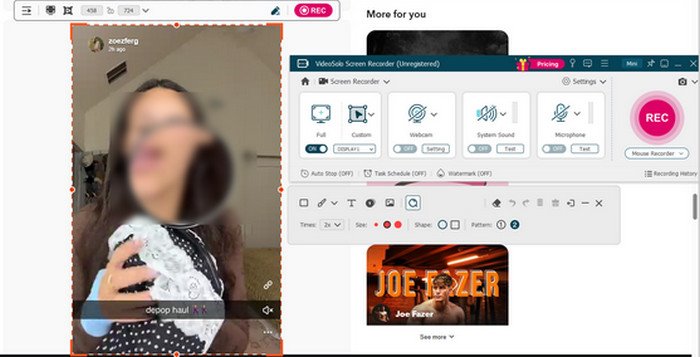
Step 3. Frame the Snapchat Web video area and hit REC to record chat videos or stories seamlessly.
Step 4. During the recording, click Edit (a pen icon) to draw and add text, highlights, or more styles on the video.
User Review
I opened Snapchat in Chrome and started a video call with a friend. You just need to pick your recording area, toggle your audio sources, and hit the red REC button. No confusing menus or hidden settings. I didn't notice any lag or frame drops during the 20-minute call. What’s more, my friend did not get any notification whatsoever. No screenshot alert, no recording warning, nothing in the chat after the call ended. I checked with her afterward, and she had no idea I was recording. At last, I saved the recording as an MP4 without any watermark.
Note:
It’s the best desktop-only method without triggering notifications. If you're trying to record a mobile-to-mobile call, VideoSolo Screen Recorder still provides a recording shortcut for you. Go on!
Scenario B: Record Snapchat via Phone Recorder Mode
Highlights: High-definition 1080p/4K capture, lossless internal system audio, custom crop frames, lag-free recording.
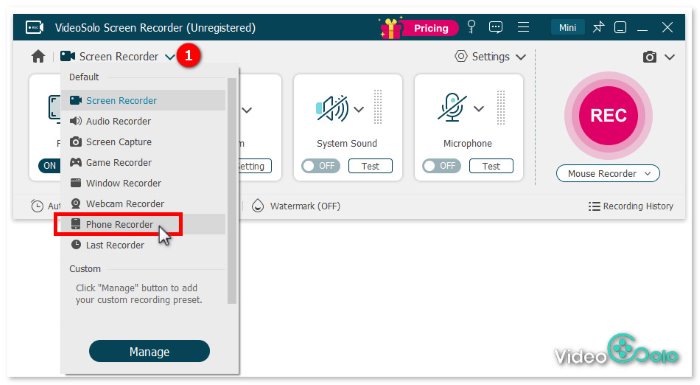
Step 1. Open VideoSolo Screen Recorder and choose Phone Recorder mode in the main interface. You can change some preferred output parameters through Settings.
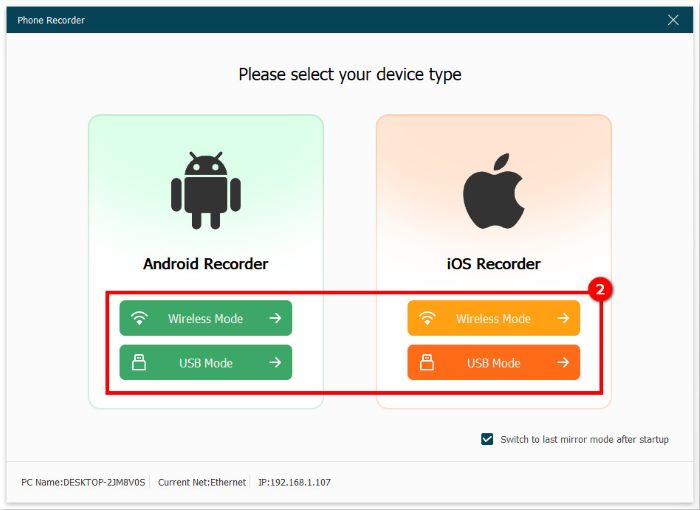
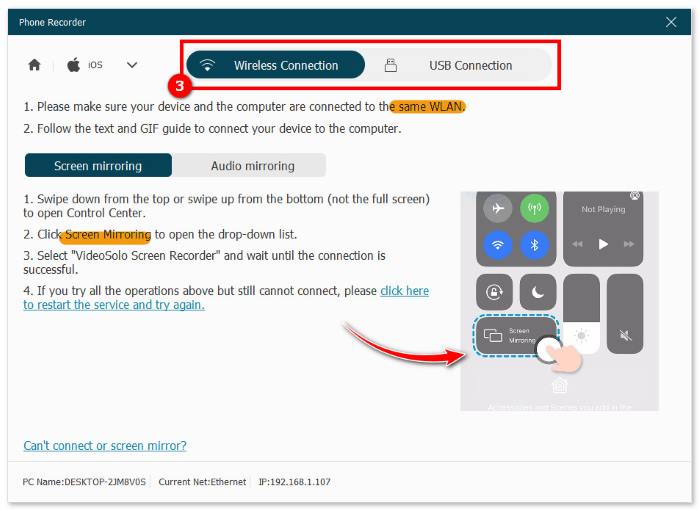
Step 2. In the pop-up window, select your mobile device and the way you want to connect to the computer, with a USB cable or wirelessly.
Step 3. Take iOS Recorder > Wireless Mode as an example. You can follow the tutorial to mirror your phone screen to your PC. Choose Screen mirroring or Audio mirroring with lossless quality and low latency.
Step 4. Open Snapchat and play the Snap or Story. Click REC to screen record on iPhone/Android, then export as MP4/MOV.
Part 3. 3 Ways for Snapchat Screen Recording on Mobile
1. Using Airplane Mode
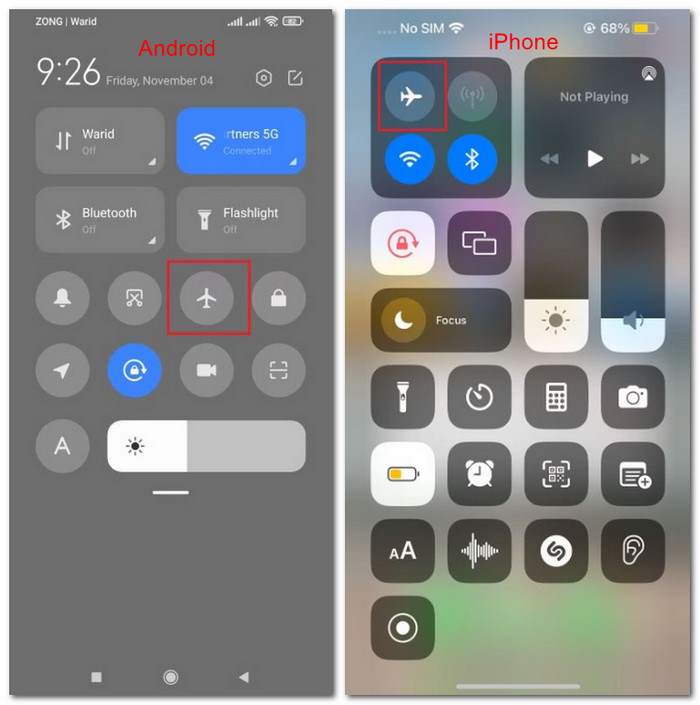
How it Works: Open Airplane Mode so there’s no mobile data, Bluetooth, or Wi-Fi connection. Snapchat cannot transmit notification data to servers during recording.
Step 1. Open Snapchat and pre-load Snaps completely.
Step 2. Turn Airplane Mode on to cut off all internet connections. Now you can screen record or screenshot the Snap.
Step 3. After recording, force-close the app and clear cache/data (Settings > Apps > Snapchat > Storage) on Android. Reinstall the Snapchat app on iPhone.
Limitations: High human-error rate and risk of delayed alerts upon reconnection. So I recommend you wait for 30-60 seconds before reconnecting to the internet. It’s impractical for regular use.
2. Using Third-Party Mobile Recorders
How it Works: Utility screen capture apps can screen record Snapchat without notifications on Android or iOS.
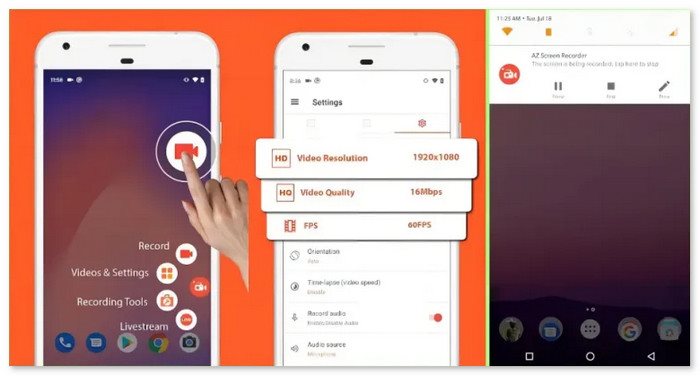
AZ Screen Recorder is one of the best screen capture software options, which can record all activities on the smartphone. You can capture Snaps or video calls in HD image quality and easily control the process with the floating icon to open the menu for recording, pausing, or stopping.
Limitations:
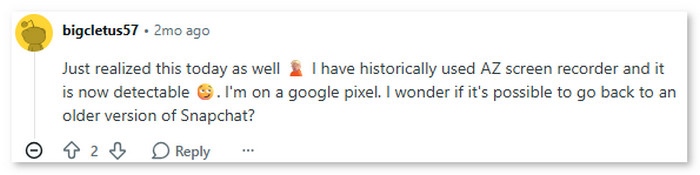
Snapchat will regularly update its detection scripts to identify popular mobile recording overlays and background processes. Using unverified third-party apps may result in temporary or permanent Snapchat account bans. Some users reported that Snapchat is now notifying them when Android screen records are used with some apps.
If you want to avoid Snapchat detection, using a desktop tool like VideoSolo Screen Recorder remains a far safer and higher-quality alternative.
3. Using a Second Phone or Physical Camera
And the least answer is, well, use another device to capture the Snap on your primary phone screen. While this clumsy way ensures 100% security, the recordings suffer from glare, poor audio, hand tremors, and poor quality.
FAQs on Recording Snapchat
Q1: Can Snapchat tell if you screen record on PC or Mac?
A: No. Snapchat cannot detect screen recording on a computer when you mirror your phone screen using desktop software like VideoSolo Screen Recorder or capture videos via Snapchat Web.
Q2: Does Airplane mode still work for screen recording Snapchat?
A: It works only if done with extreme caution. You must let the Snap pre-load, turn on Airplane mode, record, and completely force-close or reinstall Snapchat before turning the internet back on.
Q3: Is VideoSolo Screen Recorder safe for recording Snapchat?
A: Yes, VideoSolo captures the phone display externally via desktop screen mirroring. Because it operates outside the mobile OS environment, Snapchat cannot detect it or ban your account.
Q4: Will recording a Snapchat Story notify the creator?
A: Yes, native mobile screen recording on both private Snaps and public Stories will trigger a notification or append a "Recorded" badge next to your name in their viewer list.
Conclusion
While you can screen record Snapchat, mobile-only workarounds are risky, tedious, and prone to leaking notifications. The most reliable approach is to record content on Snapchat Web using a desktop screen recording program like VideoSolo Screen Recorder. It offers the most secure, high-definition, and 100% undetectable solution.
More Reading
Capture screen activities, audio, webcam, gameplay, and mobile screens on Windows and Mac with high quality.

