



 Download Screen Recorder For FREE!
Key Takeaways:
Wondershare DemoCreator Screen Recorder offers an intuitive interface with built-in video editing and virtual avatars, making it popular for simple presentations and video tutorials. But many users report some running issues, such as lag during high-FPS recording, system resource bloat, high subscription price, and annoying watermarks, which seem to make it less than perfect. For a lag-free recording with a cost-effective deal, VideoSolo Screen Recorder stands out.
What is Wondershare Screen Recorder? [Features]
Wondershare Screen Recorder, officially named Wondershare DemoCreator, is an all-in-one screen recording and video editing software designed for educators, content creators, and business professionals who need to capture their screen and edit the footage. You can capture high-quality full screen, specific windows, a target region, or even PiP.
The software supports Windows and macOS, and is also available as a web-based tool. Its core strength lies in combining high-quality screen recording with a built-in editor, virtual avatars, AI-powered tools, and a large library of creative assets. Whether you are making a tutorial, recording a presentation, or capturing gameplay, DemoCreator aims to provide a complete recording-to-editing workflow in one place.
 Features
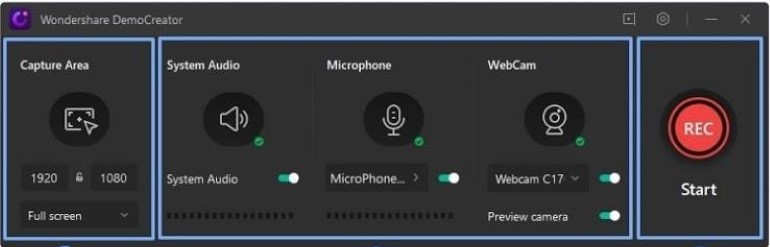
- Support up to 4K resolution and 120 FPS frame rate (Pro version).
- Record both system audio and microphone sound simultaneously or separately.
- Draw, annotate, add arrows, and highlight the cursor during recording.
- Set start and end times for automatic recording sessions.
- Trim, split, add effects/transitions/subtitles, and more.
- AI-powered features like text-to-speech, background remover, and auto subtitles.
Performance, Pricing, and Pros & Cons
 pros
pros
- Integrates recording and editing in a single program.
- Rich AI feature sets for advanced users.
- Supports up to 4K UHD and 120 FPS.
- Large effects store with 50,000+ assets.
 Cons
Cons
- The free trial limits recording to 10 minutes per video.
- Output recording with a watermark and lower quality (1080P/30FPS).
- Advanced editing tools and AI features are locked behind paid plans.
Performance
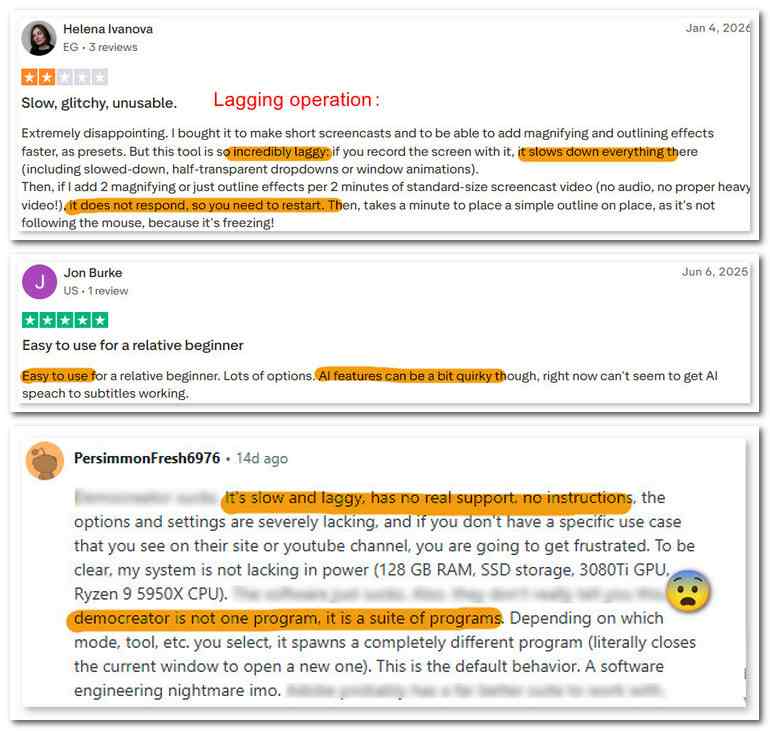
It’s optimized for smooth gameplay recording and has settings to reduce lag. Might be worth a shot if you want better performance while capturing your gameplay. But much feedback shows that black screens or lags often interrupt the process. And it will take a lot of system resources while recording.
This screen recorder is hardware-sensitive. Running DemoCreator with other applications or a game can cause high CPU and GPU usage. I have recorded League of Legends at 60 FPS or 120 FPS on a mid-range laptop, and I can feel significant dropped frames and slowdown.
Pricing
| For Windows | For Mac | |
|---|---|---|
| Individuals | $29.99/qtr $59.99/yr $79.99/Lifetime | $59.99/yr $79.99/Lifetime |
| Team/Business | Starts at $69.99 per user/yr Starts at $99.99 per user/Lifetime Custom for more than 20 users |
|
| Education | $30/yr for Students (need a student Beans account) Custom for more than 5 users |
|
We can see that there are multiple subscription plans and the overall price is quite high, which may require users to spend time comparing the pricing options. For the Individual plan that most people choose, the Windows version offers quarterly, annual, and lifetime packages, while the Mac version does not support a quarterly plan, meaning Mac users who only need short-term access are forced to pay more.
Ultimate Alternative to Wondershare DemoCreator
| Feature | Wondershare DemoCreator | VideoSolo Screen Recorder |
|---|---|---|
| Rating | 4.6/5 ⭐⭐⭐⭐ | 4.7/5 ⭐⭐⭐⭐ |
| Recording quality | Up to 4K/120 FPS (paid only) | Up to 4K/60 FPS |
| Performance | ️High CPU/GPU usage Lag reported on mid-range PCs | Optimized for smooth, lag-free recording |
| Built-in editing | Basic on free; advanced on paid | Advanced Trimmer/Compressor/ Video Merger/Video Converter |
| Annotation tools | ✅️ (Paid) | ✅️ (Free) |
| Noise reduction | AI denoise (credit-based) | Built-in Free |
| No Watermark | free version❌️ Pro version ✅️ | No watermark |
| Pricing | $59.99/year or $79.99 perpetual | $14.95/month or $59.95 lifetime |
| Platform | Windows 7/10/11 (64-bit) macOS v10.15 and later | Windows 11/10/8.1/8/7/Vista/XP (32/64-bit) macOS X 10.12~27 |
| System impact | High | Low |
VideoSolo Screen Recorder delivers no-lag 4K screen recording with high-quality system and microphone audio. During recording, you can freely add text, lines, arrows, shapes, keyboard callouts, mouse/magnifying glass effect for emphasis. It supports a full editing toolkit – you don’t need to buy a separate editor or upgrade to unlock creative tools. And VideoSolo is a more cost-effective HD screen recorder than Wondershare.
Features
- Various recording modes for gameplay, video, audio, etc.
- Provides scheduled recording and auto-stop recording.
- Record your screen in quality up to 4K/60FPS.
- Offer noise reduction & audio enhancement.
- Advanced editing tools to polish your videos.
- 10+ output formats for different devices' compatibility.
- Customize handy hotkeys in preferences for quick recording.
pros
- Record your screen with low latency.
- Trim, duplicate, compress, add, merge, or convert videos.
- Lock targeted windows for a clean and mute-notification recording.
- Scheduled recording lets you be free from constantly monitoring.
- No watermark in the output video.
Cons
- No webcam shooting and noise cancellation for free users.
- Can’t record audio from a specified app before purchasing.
User Review
In a review by TwitGoo, the software was commended for its extensive recording options, reliable performance, and the ease with which it captures both video and audio. I recorded gameplay on Windows PC (a 3-minute clip at 720p/60fps in MP4). There is some loss in output quality, but with no dropped frames or stuttering. Surprisingly, the recording process consumed only 5% CPU and about 50MB of RAM. But when I tried recording on a dual-monitor setup, the software struggled. For single-monitor users, this won't be an issue, and it didn't affect my recordings at all.
FAQs on Wondershare DemoCreator
Q: What is the difference between DemoCreator and Filmora?
A: They are both screen recorders belonging to Wondershare, but they focus on different purposes. Filmora Screen Recorder is designed for professional editing and post-production. DemoCreator focuses on screen recording capabilities.
Q: Is there a better alternative to DemoCreator?
A: VideoSolo Screen Recorder offers smoother performance, a full editing toolkit included in the price, built-in noise reduction, and a lifetime license for $59.95 — less than DemoCreator’s yearly subscription. It is a lighter, more cost-effective option for most users.
Conclusion
Wondershare DemoCreator is a capable all-in-one screen recorder with a rich feature set for power users. However, some limitations in the free trial, unmatched system resource usage, high pricing, etc., make it not quite fit for everyday users. For those who want a smoother recording experience, VideoSolo Screen Recorder is worth a try.
More reading
Capture screen activities, audio, webcam, gameplay, and mobile screens on Windows and Mac with high quality.

