



 Download Screen Recorder For FREE!
tl;dr
This post provides a comprehensive review of Bandicam Screen Recorder. We evaluate where the product excels in performance and where it falls short in features, followed by a targeted recommendation for a better alternative.
Bandicam Screen Recorder is now known to be a reliable solution for smooth gameplay recording with low CPU usage. As the product is constantly upgrading, users also want to determine if it is still worth buying. The review covers everything from evaluating features, pricing, and performance, to testing experience and user feedback. While confirming its basic strengths, we highlight clear drawbacks and give another powerful tool, VideoSolo Screen Recorder, to perform better.
What is Bandicam?
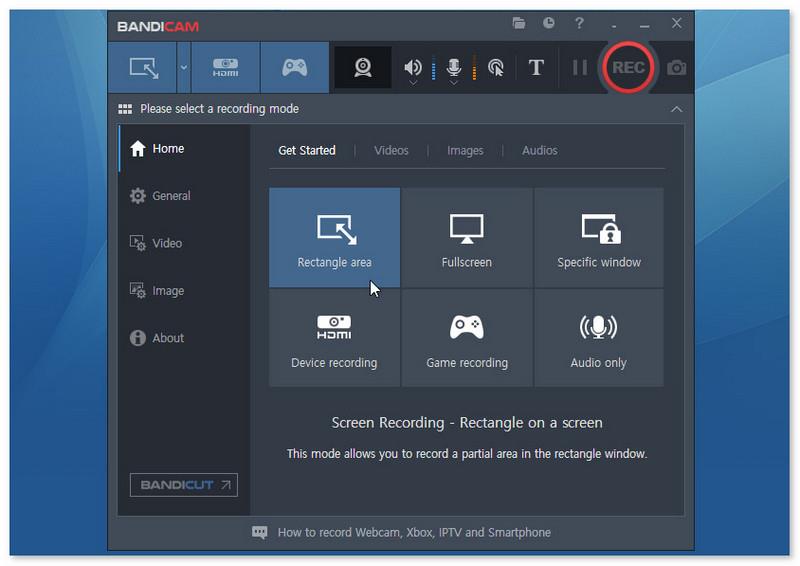
Bandicam is a mature screen recording desktop software built since 2008, which serves gamers, online educators, technical trainers, and everyday content creators. As a no-lag screen recorder with hardware acceleration via NVIDIA NVENC and AMD VCE/VCN, it consumes minimal CPU and saves small video files through compression. You can choose from 3 recording modes, including screen recording, game recording, webcam recording, and external device recording, like webcams and game consoles.
Especially for game recording mode, it supports capturing high-resolution windows and allows users to capture games/streaming videos that use DirectX/OpenGL graphics technologies, ensuring the recording screen has no window edges or other content.
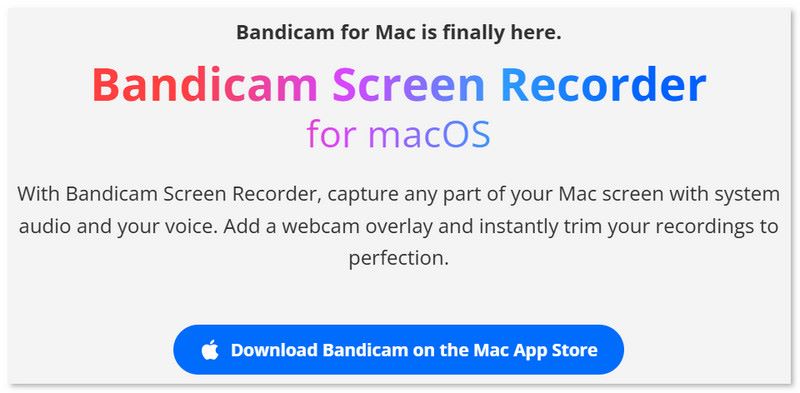
Most people just know there is a Windows PC version of Bandicam – However, it launched its Mac version in 2025. That’s certainly great news for Apple users. Read on to learn more.
Features, Pricing and Limitations of Bandicam
 Note
Note
Bandicam for Mac and Windows are separate apps with different licenses. So here we will introduce the features of each software separately.
| Features | For Windows version | For Mac version |
|---|---|---|
| Flexible Screen Capture (specific program/area or full screen) | ✅️ | ✅️ |
| Screen Recording with Webcam | ✅️ | ✅️ |
| Record system sound and microphone audio | ✅️ | ✅️ |
| Live Screen Annotation | ✅️ | ✅️ |
| Scheduled recording | ✅️ | ❌️ |
| No Watermark | ❌️ | ❌️ |
| Built-in Video Editor | ❌️ | ❌️ |
| AI Video to Text | ❌️ | SRT subtitles (Full access in Pro Plan) |
| High-quality Recording | 4K/480 FPS | 5K 60FPS |
Is Bandicam safe?
Bandicam offers a free version for Windows only. For more features or to switch to the Mac version, you have to subscribe to its various plans based on your demands.
| Pricing Plans of Bandicam 2026 | |
|---|---|
| 1-PC/1-Year for individuals | $33.26 |
| 1-PC/Lifetime License Bandicam 2027 | $53.90 |
| 1-PC/1-Year access for business use | $49.46 |
| 2-PC/1-Year access for business use | $95.92 |
| 1-Mac/Monthly | $9.99 |
| 1-Mac/Yearly | $39.99 |
 pros
pros
- Record Internet videos/ audio, online meetings, and call images.
- Capture selected area of the window even if it is covered by other programs.
- Mark on the screen using pens, shapes, and arrows.
- Screen recording with your facecam for tutorials, PPT presentations, etc.
- Auto-transcribe videos and generate SRT subtitles (Mac Pro Version only).
- Record dual/multiple monitors simultaneously.
 Cons
Cons
- The Windows free version records up to 10 minutes, while the Mac version is limited to 5 minutes.
- The recorded footage includes a Bandicam watermark.
- No built-in advanced video editor.
- Game users can only record videos but not stream live.
- The interface feels more like an old-school game recorder.
Performance and User Review of Bandicam
Testing Experience
Video Quality & FPS: 4.5/5 ⭐⭐⭐⭐
Audio Capture & Controls: 3.5/5⭐⭐⭐
Performance & CPU: 5/5⭐⭐⭐⭐
Ease of Use & UI: 3/5⭐⭐⭐
Video Editing: 2/5⭐⭐
Value for Money: 3/5⭐⭐⭐
Overall Rating: 3.9/5 ⭐⭐⭐
During my test, Bandicam launched quickly and took relatively few system resources. However, I couldn’t evaluate the performance of longer recordings due to many limits in the free version, although Bandicam says it supports sustained recording for 24 hours & 365 days. To be honest, if you have both a PC and a Mac computer, and need to switch between them frequently, it’s extremely unhandy and not cost-effective…You have to buy the license twice.
The program tends to focus on video recording, not editing. I can understand that it lacks a rich-featured video editor. But it’s not enough to only make simple adjustments to the video length and even pay for the trimming feature on Mac.
User Review
I’ve been recording screens for years, for game clips, coding tutorials, bug reports, client walkthroughs. Bandicam surprised me. I thought it would be garbage because the UI looks like it’s from 2012. But it’s been weirdly stable. I’ve recorded 1080p60 gameplay and coding walkthroughs at the same time, no stutters. What annoyed me is that UI is ugly — just lazy ugly.
Watermark and 10-minute limit on free version. – @ Consistent_Manner661 from Reddit
Using this program for 5+ years and it is a great asset for screen recordings, especially love that you can use it for free within limits, which is why it is so great for tutorials and short demos. However…if you try to record the vid with the voice - you can't hear clearly even through changing the microphone option (I tried both with built-in mic and with the earphones, both were horrible). – @Oksana Mikhaylichenko from Trustpilot
Best Bandicam Alternative
You may clearly know whether the screen recording software is fit or not. If you don’t care and just need something to record the screen, Bandicam is an overall tool that works without digging into settings hell. But for advanced, limitless features or better system compatibility, I’ll suggest you try VideoSolo Screen Recorder, which overcomes all restrictions from Bandicam. It can record high-quality screen up to 4K/60FPS with internal/external sound that supports noise cancellation. No more worrying about the voice not being heard well enough. And the recorded video is free from any watermark even with the free version.
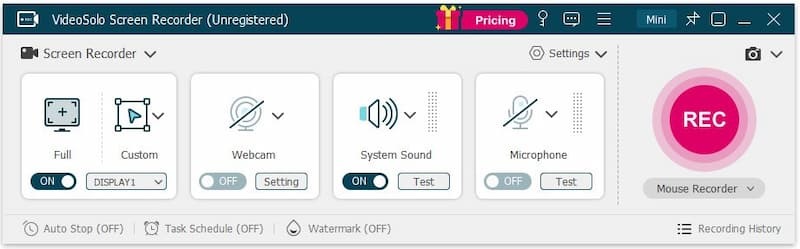
What’s more, VideoSolo Screen Recorder can pull in a wider audience with more diverse features. It provides 20+ recording modes — You can record streaming video on YouTube, Netflix, Hulu, and Amazon Prime, online courses, webinars (Zoom, Google Meet, etc.), gameplay clips, and mobile screen. You can take full control of your recording with its embedded video editing toolkits.
 Features
- Provide scheduled recording and auto-stop recording.
- Adjust output video/audio format and quality.
- Microphone noise and camera noise reduction & enhancement.
- Trim, duplicate, compress, add, merge, or convert videos.
- Real-time annotation during recording.
- 10+ output formats for different devices' compatibility.
- Customize handy hotkeys in preferences for quick recording.
pros
- Mirror and record your screen with low latency.
- Lock targeted windows for a clean and mute-notification recording.
- Timed recording allows you to do other things without constantly monitoring.
- Record your screen with your face and voice with little lag.
Cons
- The free trial doesn’t allow continuous webcam shooting and noise cancellation.
- You can’t record audio from a specified application before purchasing.
How to screen record with VideoSolo?
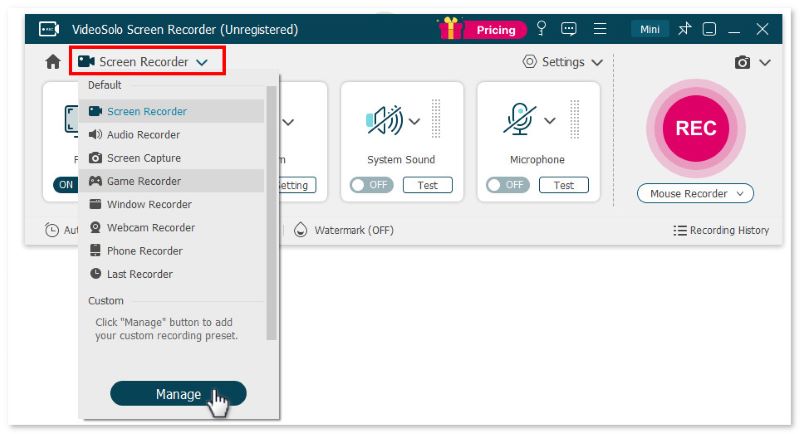
Step 1. Open the program and choose a recording mode.
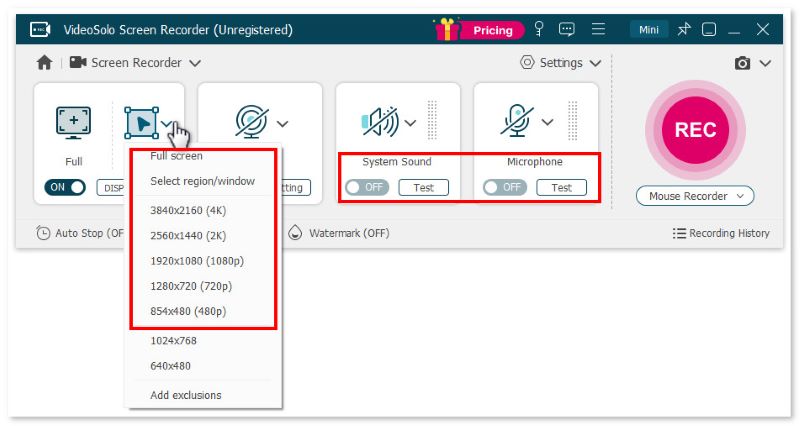
Step 2. Select Full or Custom to decide the recording area. Then adjust the volume bar of the system sound and microphone according to your needs.
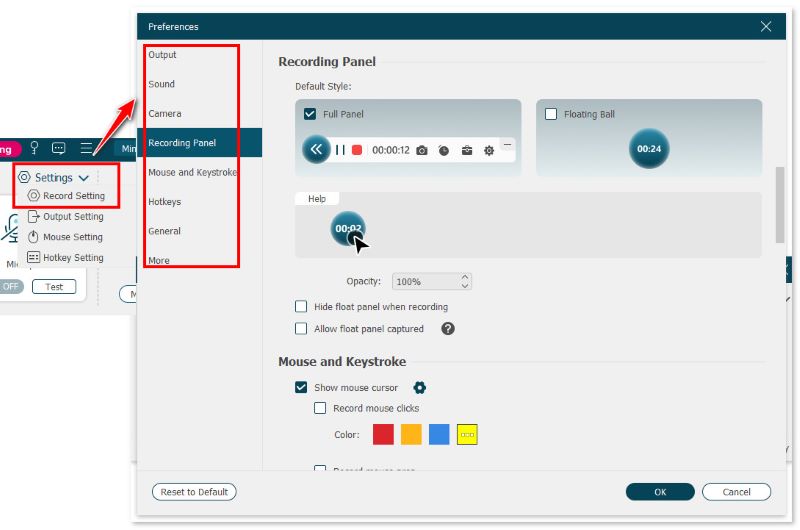
Step 3. Click Setting > Record Setting > Preferences on the interface. You can choose video format, video quality, frame rate, and location of output files here.
Step 4. Click REC to start recording when a reminder box pops up with hotkeys. You can still use the cut-screen feature to capture your preferred images.
Feedback
Rohan Mathawan, a Content Editor at Techstory Media, reported, “The trial edition only allows you to store three minutes of each recording video (there is no time limit for recording). If you want an easy-to-use and powerful screen recorder, VideoSolo Screen Recorder is worth a shot. Setting recording length, task scheduling, modifying recording preset, and other complex capabilities are available.”
How to Choose: Bandicam vs. VideoSolo
| Features | Bandicam Screen Recorder | VideoSolo Screen Recorder | Winner |
|---|---|---|---|
| Supported System | Windows 11/10/8/7 64-bit, macOS 13.3 (Ventura) or later | Windows 11/10/8/8.1/7/XP, Mac OS X 10.12 or above (including macOS 26) | VideoSolo |
| Price | $9.99~$95.92 | $14.95/Month $49.95/Year $59.95/Lifetime | Halve a match |
| Video Quality | 4K/480 FPS 5K 60FPS | 4K/60FPS | Bandicam |
| Auto Stop Recording | ❌️ | ✅️ | VideoSolo |
| Edit Video | Real-time drawing and post-trimming | Advanced trimmer, video compressor/merger/converter | VideoSolo |
| Audio Reduction/Enhancement | ❌️ | ✅️ | VideoSolo |
| Recording Modes | 3 | 20+ | VideoSolo |
Verdict
In general, Bandicam is favored by many people who place more weight on speed and ease of use than on the complex post-editing tools. But in contrast, VideoSolo provides powerful functions and can almost be said to be suitable for pro users and regular users.
FAQs on Bandicam Screen Recorder
Q1. Is Bandicam screen recorder free?
A: Bandicam is not completely free software. The free trial version has a strict 10-minute recording limit per video and adds an official watermark (www.bandicam.com) at the top of recorded videos. To remove the watermark and record without time limits, you have to purchase a paid license.
Q2: Will Bandicam cause lag while recording games?
A: Bandicam is well-optimized for low resource usage with hardware acceleration (NVIDIA NVENC, Intel Quick Sync, AMD VCE) to minimize performance drops. However, on lower-end PCs or when recording demanding 4K games at high bitrates, minor frame drops can still occur sometimes.
Q3: Can Bandicam record system sound and microphone at the same time?
A: Yes, Bandicam captures system audio and microphone sound simultaneously. But many users reported that the audio is often out of control. All the audio, like microphone sound and game audio, is recorded onto one track, so it’s hard to raise a single sound. For crystal-clear sound, VideoSolo Screen Recorder is a much better alternative, as it comes built-in with advanced noise cancellation and audio enhancement features to deliver professional audio recordings.
Final Verdict
Bandicam Screen Recorder excels at high-fps gameplay capture but falls short in flexibility, editing, and platform compatibility. If you are looking for a versatile capture tool that seamlessly handles both desktop and mobile screens while offering advanced audio noise reduction and built-in editing, VideoSolo Screen Recorder remains a solid choice. Download it to simplify your recording workflow!
More Readings
Capture screen activities, audio, webcam, gameplay, and mobile screens on Windows and Mac with high quality.

