



 Download Screen Recorder For FREE!
Quick Answer
Instagram currently does not notify users when someone screens a Story. Notifications are only showed for disappearing photos and videos sent via direct messages in vanish mode. To save intact Instagram stories, using a best screen recording software like VideoSolo Screen Recorder is the efficient solution.
Instagram stories can’t be accessed after 24 hours, so many users frequently find ways to capture and archive important clips, tutorials, and memorable posts. To screenshot Instagram stories with high quality, VideoSolo Screen Recorder is the recommended tool for screen capturing or screenshotting lossless stories. The post explains Instagram's current screenshot notification rules, provides how to capture stories seamlessly, and tips to protect your content from screen capture.
Part 1. Does Instagram Notify When You Screenshot a Story?
Can people see if you screenshot their Instagram story? No. Many users mistakenly assume Instagram enforces the same strict screenshot detection policies as Snapchat. In fact, it varies depending on where and how the content is shared. You can screen capture Regular Stories, Close Friends Stories, and Story Highlights with no alert, pop-up, or indicator.
- • Public Instagram Stories: Freely capture or record any public story without sending notifications.
- • Close Friends Stories: Stories shared with a restricted close friend don’t show any alerts.
- • Story Highlights: Highlights saved on a user profile can be recorded silently at any time.
- • Feed Posts and Reels: Taking screenshots or recording videos from the main feed or Reels section triggers zero notifications.
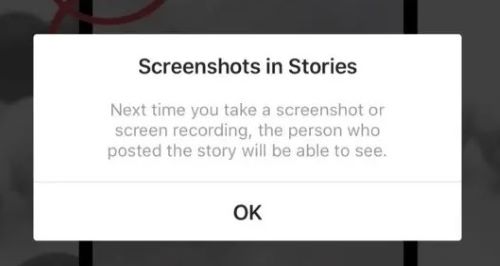
Instagram once briefly introduced the Instagram Story screenshot notification feature, but it was removed in June 2018. And there is the only exception: disappearing direct messages. If a user sends a private photo or video set to "view once", "allow replay", or within "vanish mode", taking a screenshot or recording the screen will immediately display a small starburst icon next to the message and notify the sender.
Part 2. How to Screen Capture an Instagram Story?
Honestly, I believe most Instagram users are recording the screen with good intent. You might be trying to prevent accidental clicks on content that is set to be deleted after being read, so you don’t have to check it in time. Or maybe you want to save and organize your daily activities using screen captures on your local device. Some people also use this feature to screenshot stories from Instagram to friends who haven’t followed that account or don’t have an Instagram account.
Instagram does not offer a feature for saving quick shots, so you’ll need to rely on third-party tools. VideoSolo Screen Recorder is a professional recording tool, allowing you to capture Instagram Stories with ultra-high resolution without missing any details.
 pros
pros
- Easy to use for all recording scenarios.
- Auto-stop, task scheduling, and lock-window recording.
- Record any on-screen content on Instagram beyond public posts.
- Advanced video editing toolkit.
- Smooth, lag-free performance on longer recordings.
 Cons
Cons
- Only has desktop version.
- Limit to 3 minutes per video in the free version.
 Features
- HD screen capture: Instagram Stories usually contain high-quality images and dynamic videos. VideoSolo supports up to 4K/60fps recording, perfectly preserving the original video.
- Flexible capture region: VideoSolo allows you to freely select a specific area to record, easily removing browser borders and unwanted screen areas to keep only the Story content itself.
- Real-time editing and annotation: You can add text, arrows, highlights, and other annotations to emphasize key points. After recording, the built-in advanced video editor provides various features for polishing the recorded content.
- Add narration: Record videos on Mac/PC with internal audio and microphone voice while providing noise cancellation to ensure clear sound quality.
- Mobile screen mirroring: VideoSolo offers a Phone Recorder Mode to mirror your iPhone/Android screen to your computer. You can save a lot of Stories without worrying about limited phone storage space.
How to screen capture Instagram Stories?
Way 1. Screen Recorder Mode
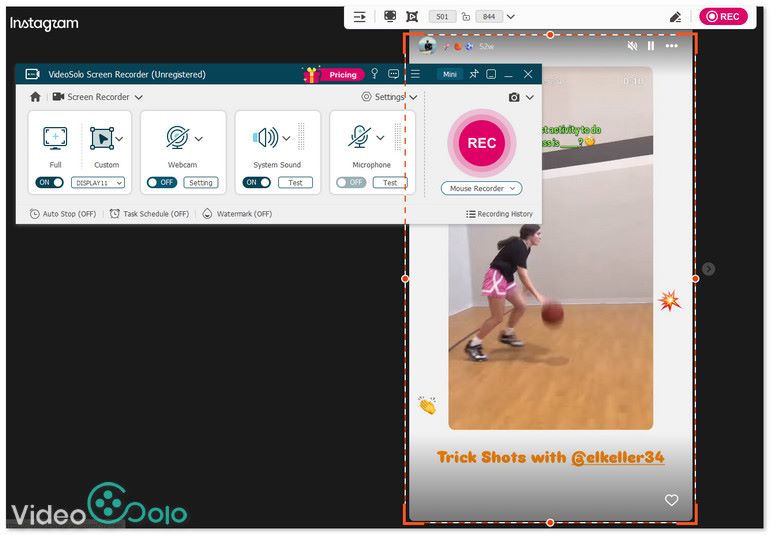
Step 1. Log in to Instagram on the browser and find what you want to capture.
Step 2. Choose Screen Recorder Mode in the software and custom the recording area.
Step 3. Click REC to record stories or set a time a start recording.
Step 4. During the recording, click Edit (a pen icon) to draw and add text, highlights, or more styles on the video.
Way 2. Phone Recorder Mode
Step 1. Open VideoSolo Screen Recorder and choose Phone Recorder mode in the main interface. You can change some preferred output parameters through Settings.
Step 2. In the pop-up window, select your mobile device and the way you want to connect to the computer, with a USB cable or wirelessly.
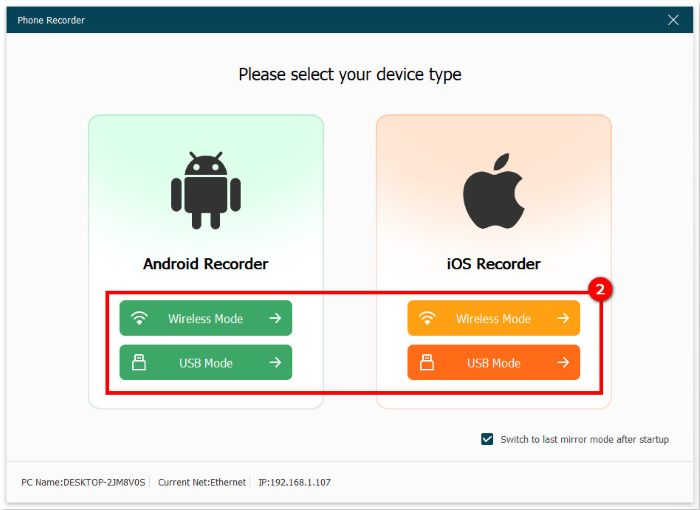
Step 3. Take iOS Recorder > Wireless Mode as an example. You can follow the tutorial to mirror your phone screen to your PC. Choose Screen mirroring or Audio mirroring.
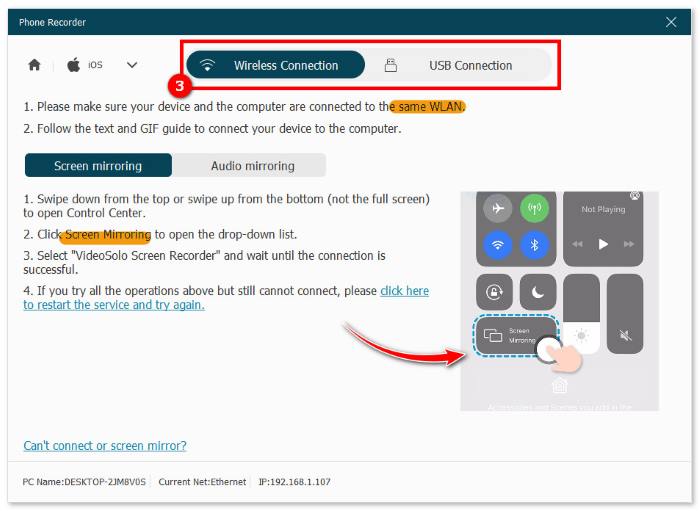
Step 4. After done, you can record or screenshot Instagram videos as you like.
While mobile workarounds exist (Screen Recording feature), the native way often leads to low bitrates, cropped dimensions, mobile notification interruptions, and muffled background sound. It’s better to try the ultimate method available to screen record on Android or iPhone.
Part 3. Protect Your Instagram Story from Screenshots
You might be concerned that others can easily copy and share your content without the origin marked. If you are particularly sensitive about the privacy of your Instagram Stories, there are several built-in settings to protect your videos:
- • Private Account: switching to a private account ensures that only approved followers can view your posted Stories and posts.
- • Close Friends List: share specific Stories exclusively with a curated list of trusted users, limiting your content's visibility to those you choose.
- • Hide Story or Block Users: manually hide your Stories from specific individuals or block unwanted users altogether to prevent them from accessing your feed.
It is worth noting that while these measures significantly enhance control over who views your content, they cannot completely prevent approved followers from taking screenshots or screen recordings of your Stories.
FAQs on Screen Capturing Instagram
can someone see if I screenshot their Instagram story?
No, Instagram does not notify users when someone screenshots or screen records their stories. You can only see the viewer list of who watched your story, but not who captured it.
what is the safest way to save Instagram stories?
The most reliable way is to ask for the creator's permission before recording. For personal offline recording, using a professional desktop recorder like VideoSolo Screen Recorder ensures you capture lossless up to 4k resolution without relying on mobile device limitations.
Does Instagram notify when you screenshot a direct message?
Yes. Instagram only sends screenshot notifications for disappearing photos or videos sent via private direct messages.
Conclusion
Standard stories, highlights, and posts can be captured silently without triggering any notifications. For creators and casual viewers who want to save high-quality media, VideoSolo Screen Recorder stands out as the best choice for capturing Instagram Stories thanks to its powerful functionality and ultimate convenience.
More Readings
Capture screen activities, audio, webcam, gameplay, and mobile screens on Windows and Mac with high quality.

