



 Download Screen Recorder For FREE!
Your needs will determine which music recording software is best for you. While VideoSolo Screen Recorder is a more straightforward option for fast, high-quality audio recording, DAWs are best for full music production.
When I first look at music recording tools, the number of options can be a little overwhelming. Some programs come with countless controls, plugins, tracks, and settings that I may never use. Then there are audio routing and latency issues that can make a simple recording feel much harder than it should. That's why I think the right music recording software isn't necessarily the one with the most features, but the one that fits the way I work. In this guide, I'll compare different options for beginners, creators, and more experienced producers so you can see which one makes the most sense for your setup.
- Part 1. Comparison of 6 Music Recording Software
- Part 2. Key Features to Look for in Music Recording Programs
- Part 3. VideoSolo Screen Recorder: Best Music Recording Programs for Beginners
- Part 4. Other Best Free Music Recording Programs for Pro Users
- Part 5. Industry Standard Paid Music Recording Software
- Part 6. FAQs on Music Recording Software
How We Test
I evaluate each music recording tool on the aspects mentioned above, like the audio quality, time consumption for setup, support of input sources, editing options, and general user-friendliness. Besides that, I also judge how successfully each one records and plays back the system audio and microphone input. Thereby, the final results mirror the actual recording requirements rather than the quantity of features offered.
Part 1. Comparison of 6 Music Recording Software
This is a quick comparison of the six choices based on what each one is best for, how quickly I can get going with it, what audio sources it supports, and its price.
| Music Recording Software | Primary Use Case | Setup Speed | Audio Source Versatility | Price |
|---|---|---|---|---|
| VideoSolo Screen Recorder | Quick, high-quality audio capture | Very Fast | System audio + microphone | Free & Paid |
| Audacity | Recording and audio editing | Fast | Microphone + system audio | Free |
| GarageBand | Music creation and songwriting | Fast | Microphone + instruments | Free |
| Adobe Audition | Professional audio editing and post-production | Moderate | Microphone + system audio | Subscription |
| FL Studio | Beat making and electronic music | Moderate | Microphone + instruments | Paid |
| Ableton Live | Music production and live performance | Moderate | Microphone + instruments + system audio | Paid |
Part 2. Key Features to Look for in Music Recording Programs
If I were to search for recording software for music, then I would look for the features that have an effect on the recording/production task, not choose the one with the most features.
Multitrack Recording and Low Latency
In music production, the ability to individually record vocals, guitars, and MIDI instruments on separate tracks is really crucial. Also, a very good low-latency feature helps the player keep in sync with the performance and recording without a feeling of delay.
Editing and Post-Production Tools
Good editing tools can really do wonders even after you've done the recording. You have to watch out for features such as waveform or spectral views, equalizers, compressors, noise reduction, and other tools for cleaning and shaping the last sound.
Third-Party Plugin Support
Allowing external plugin compatibility makes it possible for me to extend the software's built-in effects and instruments beyond just what it has. Compatibility with plugin formats, e.g., VST, AU, or LV2, makes the process of adding the tools already in place much simpler.
File Formats and Export Quality
I would also make sure which formats the software recognizes both when you do the recording and exporting. While WAV and FLAC are excellent for holding master quality or lossless files, MP3 comes in handy whenever I need a smaller file that can be shared or distributed.
Part 3. VideoSolo Screen Recorder: Best Music Recording Programs for Beginners
VideoSolo Screen Recorder is a desktop recording software with an Audio Recorder feature that allows you to record system sound, microphone audio, or both. The tool also makes high-quality audio recording easier. It functions flawlessly on Mac and Windows computers.
How to Record Music
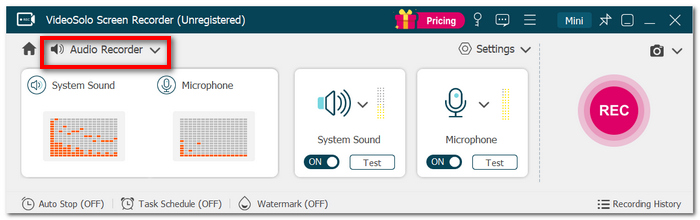
Step 1. Open VideoSolo Screen Recorder and choose Audio Recorder from the main interface.
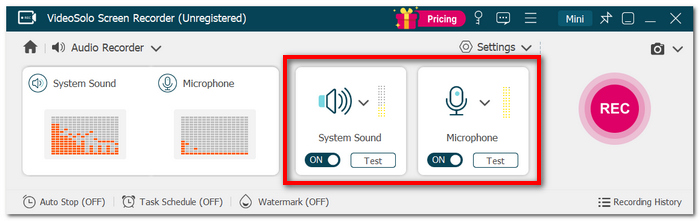
Step 2. Switch the sources, such as System Sound, Microphone, or a combination of both. Modify sound levels and other sound preferences.
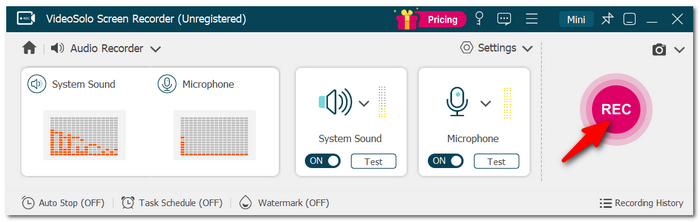
Step 3. Click on REC to begin the recording. Put on the song or audio that you are interested in saving.
Step 4. Hit the Stop button to end the process. Take a look at the recording and save it as an audio file in your preferred audio format.
User Review: VideoSolo has highlighted the user feedback, which mainly praises its intuitive interface, stable operation, and easy recording process.
If a beginner is looking for the best audio recording software, then VideoSolo Screen Recorder gives what may seem like an easy starting point without the overload of a full DAW.
Part 4. Other Best Free Music Recording Programs for Pro Users
1. Audacity – Best for Free Multi-Track Recording
Best For: Totally novices needing a free, open-source tool for recording audio and editing several audio tracks.
The Audacity music recording software is a free, open-source audio recorder and editor that is available for Windows, macOS, and Linux. It can do multi-track recording, audio effects, and noise which also support the popular formats such as WAV, MP3, and FLAC.
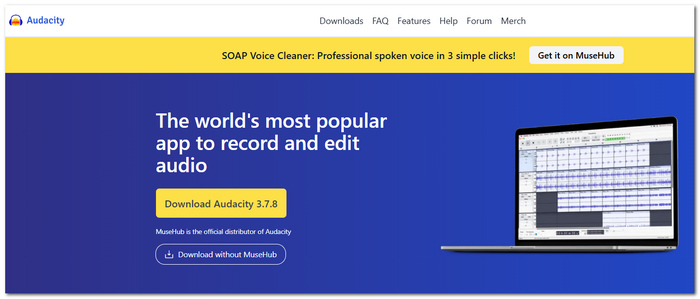
 pros
pros
- Completely open source and free audio recording software.
- Features a multi-track recording capability, as well as detailed and sophisticated audio editing tools.
- Cross-platform compatibility for Windows, macOS, and Linux. Third-party plugin support is also provided.
 Cons
Cons
- The interface may not feel so intuitive on first-time use, mostly for users who are used to or coming from modern DAWs.
- It lacks the necessary strength and tools to create complex MIDI-based compositions or virtual instruments compared to complete DAWs.
User Review: I believe one of the reasons Audacity is still a top pick is that it offers recording and editing features together without the user having to subscribe. On top of that, the user can get many community-developed plugins thanks to the free, open-source nature of the software.
2. GarageBand – Best for Easy Songwriting and Loop Building
Best For: Mac users who are looking to do things like record instruments, compose songs, and deal with loops, but do not want the complexity of major music software.
GarageBand for Mac is Apple's free music production software that includes instruments, Apple Loops, virtual drummers, audio effects, and recording tools. It also enables multi-track recording plus MIDI editing.
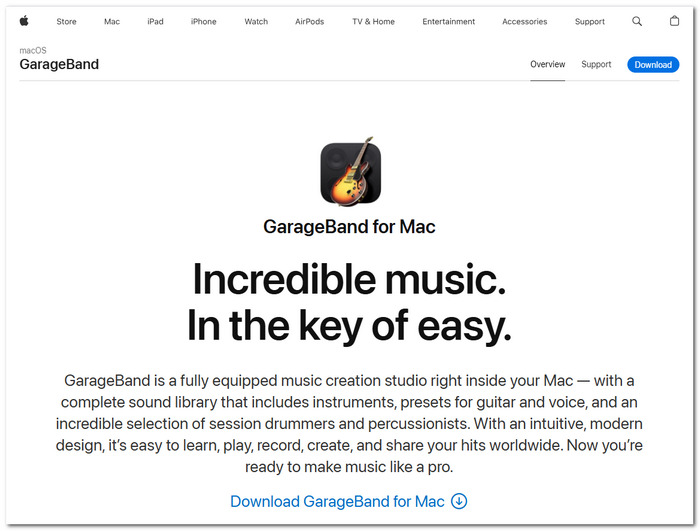
pros
- Easy to use and suitable for beginners.
- Big loops, instruments, and a virtual drummer library.
- Has nice recording, mixing, EQ and a range of effects features.
Cons
- Exclusive to Apple platforms.
- Hard to compare with pro DAWs if you want to do advanced production processes.
User Review: GarageBand is a powerful choice for Apple users. They can simply record music while using the built-in instruments and songwriting functions without having to deal with a complex setup.
GarageBand is an ideal first step for music recording on Mac. Users who are trying to find the best music recording software for Mac are recommended to try GarageBand for writing music and basic music production.
Part 5. Industry Standard Paid Music Recording Software
1. Adobe Audition – Best for Professional Audio Restoration
Best For: Those who are musicians or creators who require an in-depth edit, cleanup, and post-mix of multitrack recordings.
Adobe Audition is a top-level audio workstation for creating, editing, mixing, and audio restoration purposes.
pros
- Enhanced visual display of spectral frequency with tools to identify and eliminate noise.
- Audio restoration features allowing you to eliminate background noise, pop/click sounds, and improve vocal tracks.
- Fine mixing options to balance several audio elements through the multitrack editing capabilities.
Cons
- Paid subscription of Adobe necessary once the trial period has passed.
- More convenient for sound post-production rather than for complex composition or music production involving MIDI and beat-making with synthesizers.
User Review: Adobe markets Audition as a professional software application for audio recording, mixing, restoration, and post-production. It is particularly suitable when a thorough and detailed cleanup is required rather than a simplified music-production workflow.
If you're trying out free software to record music from Windows 10 audio, just bear in mind that Audition is a professional tool that you have to pay for, but its sophisticated restoration and multitrack capabilities make it appropriate for more complex projects.
2. FL Studio – Best for Beat Making and MIDI Production
Best For: Electronic music producers looking for fast beat creation, melody programming, and flexible song arrangement.
Making beats in pattern-based loops, MIDI sequencing, audio recording, mixing, and song arrangement are the main focuses of FL Studio, a complete music production environment. The Piano Roll in FL Studio is a great tool for drawing in melodies, chords, and complex MIDI patterns.
pros
- Has an excellent piano roll for detailed MIDI composition.
- Very efficient workflow in beat building and pattern arranging.
- VST, AU, and CLAP third-party plugins compatible.
Cons
- To master the software, you'll need to figure out all the available tools and options.
- Better suited for complete music production, not just for audio recording.
User Review: FL Studio is still the go-to for many of the producers who are trying to make beats and melodies in no time. Besides that, the 2026 version introduces various workflow improvements, such as a Piano Roll update and a new FLEX plugin engine working at lightning-fast speed.
If I were to list top-rated music recording software, FL Studio would be among the first when beat-making and MIDI work are the main requirements.
3. Ableton Live – Best for Real-Time Music Production
Best For: Producers and performers who need to manipulate audio in real time, including sampling, looping, and performing tools.
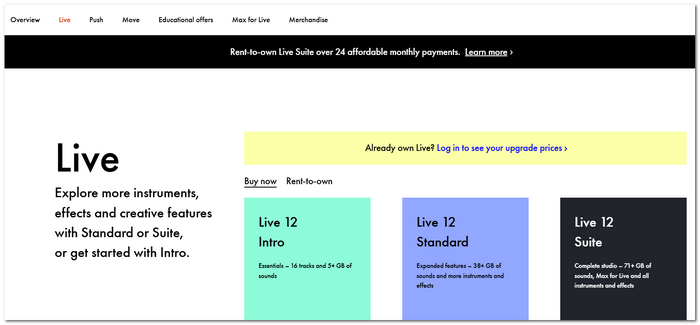
Ableton Live is a digital audio workstation developed based on the concept of traditional arrangement and live performance in Session View. Through this software, I can record both audio and MIDI, manipulate samples, adjust timing by warping, and perform or arrange music all while continuous playback is taking place.
pros
- Very helpful when it comes to modifying and performing audio in real-time.
- Has robust sampling, looping and warping capabilities.
- Comprehensive support for audio and MIDI with many instruments and effects.
Cons
- May be challenging at first given the variety of features that the program has to offer.
- Too much if all you need is to record simple audio.
User Review: I think Ableton Live is perfect for those producers who like to try out different approaches, improvise things, and reshape sounds with their fingertips. The Session View and the Arrangement View let me approach creative work differently and then translate these ideas into finished songs.
Among the music recording software available for live set-ups, sampling, or even real-time production, Ableton Live is definitely one of the top-tier options!
Part 6. FAQs on Music Recording Software
Is the MIDI keyboard a sound recording device?
Not quite. A MIDI keyboard is just like an instrument controller. Instead of capturing the sound of a real musical instrument, it sends information on how we played the notes, including the velocity and timing, and recording software interprets this and plays sounds from a virtual instrument.
What buffer size for music recording is best?
There is no one setting that works best on every computer. A smaller buffer typically means less lag time, whereas a larger buffer allows the computer more time to process data.
Why do some of the plugins give my recording session the impression of sluggishness?
Some plugins are more processing-intensive and, as a result, may slow down the performance of your computer. This delay is even more apparent when you are listening to an instrument or a vocal being monitored in real time.
Conclusion
One of the most important things to learn from this article is that it is not necessary for you to get the most complex program to be able to do some great recording. When looking for recording software for music, pick the one that is right for your purpose, such as audio recording, songwriting, beat-making, or full professional production.
More Reading
Capture screen activities, audio, webcam, gameplay, and mobile screens on Windows and Mac with high quality.

