



 Download Screen Recorder For FREE!
TL;DR
ScreenPal is a solid choice for users who rely on AI-powered features and cloud collaboration. But it’s hard to ignore that the video quality is perfect, and the free version feels so stripped down that you almost have to upgrade. Videosolo Screen Recorder, by contrast, offers unlimited recording, lossless quality, and a one‑time purchase model.
ScreenPal is a well-known lightweight screen recorder for video creation and sharing. It provides a flexible workflow for onboarding, training, and knowledge sharing. But if you switch to the free version, here are some constraints. So, would it be considered an ultimate screen recording tool? We have reviewed everything you need to know and compared it with the overall desktop software, Videosolo Screen Recorder, for your long-term productivity.
What’s ScreenPal?
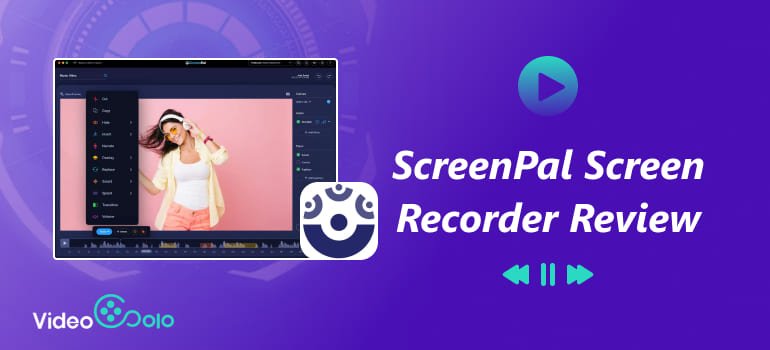
For users who are looking for a simple and accessible screen recorder, online tools like ScreenPal are enough to make demonstrations, tutorials, or other personalized videos on Windows (Vista or later), macOS (10.12 or later), Linux, Chrome, and mobile phones. Founded as Screencast-O-Matic, it gradually developed and integrated screen capture, video editing, and video hosting services. You can capture any region of your screen with external audio and your webcam – I’m sure this free screen recorder has adapted well to basic capture demands.
Pricing Plans of ScreenPal
| Plan | Target User | Price |
|---|---|---|
| Solo Deluxe | Individual / Business Users | $3/mo ($36/yr) |
| Solo Deluxe EDU | Teachers / Students | $2.25/mo ($27/year) |
| Solo Max | Professional Creators / Business | $7.50/mo ($90/year) |
| Solo Max EDU | Advanced Educational Needs | $4.50/mo ($54/year) |
| Team Business | Enterprise Teams | $8.00/mo per user |
| Team Education | Schools / Educational Institutions | $3.00/mo per user |
I found that the free version officially marked has many limitations. Even some basic functions, like unlimited recording, you must subscribe to the premium subscription to unlock them. Click here to see a comparison of the features of different plans.
And it’s a bit troublesome to have to pay a monthly fee regularly. This is where Videosolo Screen Recorder shines—offering a one-time payment with lifetime access to unlimited recording and lossless export.
What Can ScreenPal Do for You?
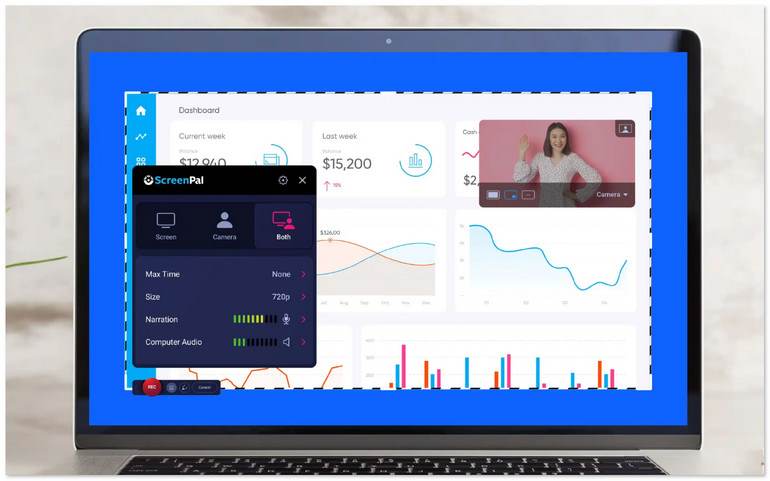
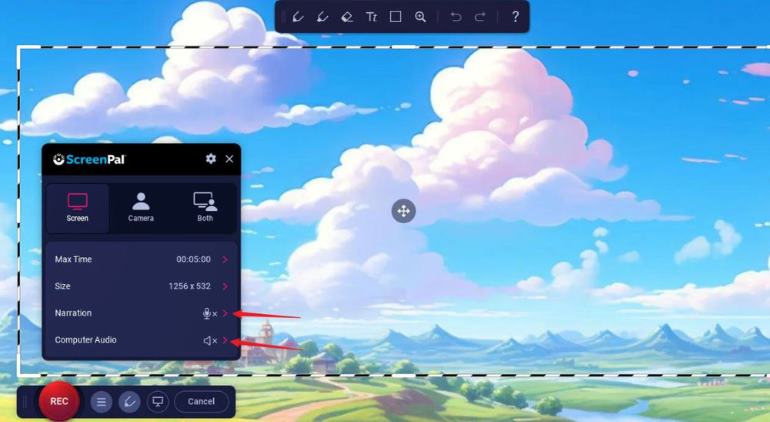
ScreenPal offers 3 recording modes, including Screen, Camera, or Both. You can turn on Narration and Computer Audio to record system audio, or internal/external microphone sound. While capturing, the program allows you to add annotations or notes in real time. It’s easy to re-add animated text, video effects, and music tracks with built-in editing tools after the process.
Besides simple screenshots, ScreenPal lets you capture scrolling windows or grab text with OCR recognition. To protect personal privacy, you can add a green screen filter or animated overlays before recording. If you don’t have large storage space, ScreenPal has built a cloud platform to keep your video files in MP4/AVI/FLV formats for fast saving and sharing. And more AI tools, such as auto-subtitle generation and AI summarization…Well, note that all these advanced functions are only available to subscribers.
Limitation
- • Free users can only record 15-minute videos instead of unlimited time.
- • To add other audio from your local folders, you need a subscription.
- • The highest video quality is up to 1080p.
- • No computer audio recording for free users.
- • Long-term recording will cause some delays and crashes.
- • Only supports yearly subscription plans.
Features offered by different Plans
| Key Features | Free | Solo Deluxe / EDU | Solo Max / EDU | Team |
|---|---|---|---|---|
| Unlimited Recorder | ❌️ | ✅️ | ✅️ | ✅️ |
| Video Editor | Basic | Full | Full | Full |
| AI captions | ❌️ (5 times) | 20 times/Unlimited | Unlimited | Unlimited |
| Text-to-Voice | ❌️ | ❌️ | ✅️ | ✅️ |
| Cloud Hosting | 2GB | ✅️ | ✅️ | ✅️ |
| Asset Library | Standard | Premium | Premium | Premium |
Testing Experience and Feedback of ScreenPal
In the test, my biggest feeling is that unless you pay annually, you can never really unlock its full potential with this tool. I recorded an 8-minute tutorial at 1080p with both microphone and system audio. Who knew computer audio is still blocked in the free version? Honestly, for most everyday use cases, 720p is OK. The MP4 file output at around 500MB, and the file included a three-second ScreenPal-branded outro.
Quynh Nguyen, a tech writer, has commented, online screen recorders rely on an internet connection and servers, which can lead to lags and crashes during long recordings, making them less stable than desktop-based applications.” Indeed, for longer recordings, you're forced to upgrade anyway and endure some lag, setup, and playback problems.
User Review
“Easy, flexible, and built-in editing that makes it simple to create effective training videos. Plus, the new AI captions and chapters are huge time savers.” – @Daphne Stanley
“What I'd like to see is a full-color rendition of the thumbnails shown on the opening page. The ScreenPal thumbnails are washed out, making it hard to see exactly what the topic is.” – @PETER BLOCH
“Then after a lot of fiddling and managing to set the computer audio, when I started a capture and played sound, the capture froze saying ‘The Microphone stopped working,’ and it did not capture anything.” – @ Simeon Galabov.
Videosolo Screen Recorder: Better Alternative
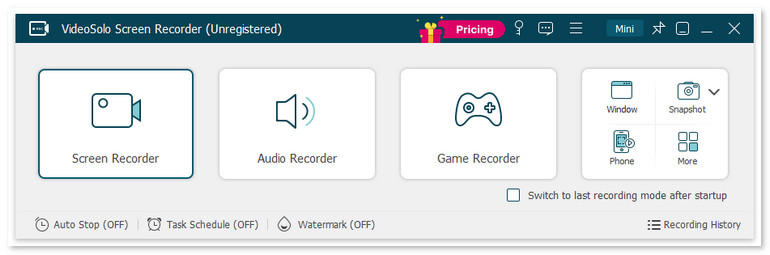
At this point in our review, you’ve realized the fact: ScreenPal is a solid tool, but its real value is locked behind an annual subscription. Without that, you can barely get any serious work done. For flawless and higher-quality screen capture, you may need a better alternative. VideoSolo Screen Recorder delivers no-lag 4K screen recording with system and microphone audio, while the tool will automatically apply noise cancellation and enhance sound effects.
Like ScreenPal, VideoSolo supports Real-time Annotation as well. You can easily draw a brush, arrows, add text boxes, and even use a magnifying glass to zoom in on details or highlight mouse trails. This saves a lot of post-editing time for those creating online courses or tutorials. It also has built-in format conversion, video merging, and compression, which are features the ScreenPal free version doesn’t have. As a multi-purpose screen recording software, it provides more capture modes for you. No matter whether you’re an educator, business professional, gamers and content creator, you can record any video and audio with a one‑time purchase.
 Features
- 20+ recording modes specialized in capturing gameplay, video, audio, etc.
- Provide scheduled recording and auto-stop recording.
- Adjust output video/audio format and quality.
- Offer microphone/camera noise reduction & enhancement.
- Advanced editing tools to polish your videos.
- Set a time for auto-stop recording and shut down the computer.
- 10+ output formats for different devices' compatibility.
- Customize handy hotkeys in preferences for quick recording.
 pros
pros
- Record your screen with low latency.
- Trim, duplicate, compress, add, merge, or convert videos.
- Lock targeted windows for a clean and mute-notification recording.
- Scheduled recording lets you be free from constantly monitoring.
 Cons
Cons
- No webcam shooting and noise cancellation for free users.
- Can’t record audio from a specified application before purchasing.
How to screen record with VideoSolo?
Step 1. Open the program and choose a recording mode as you like.
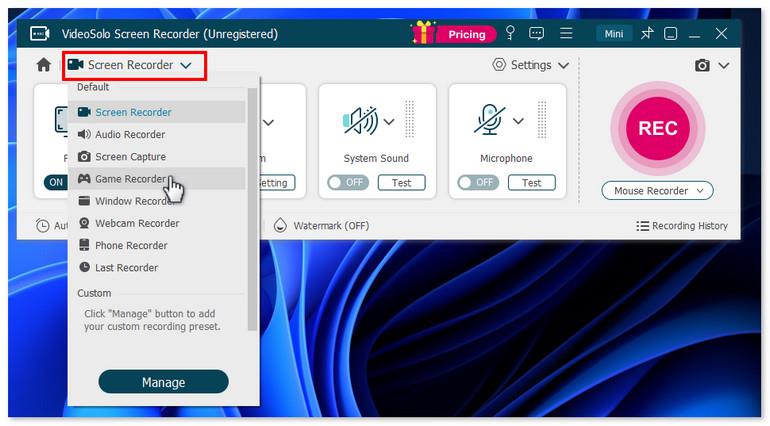
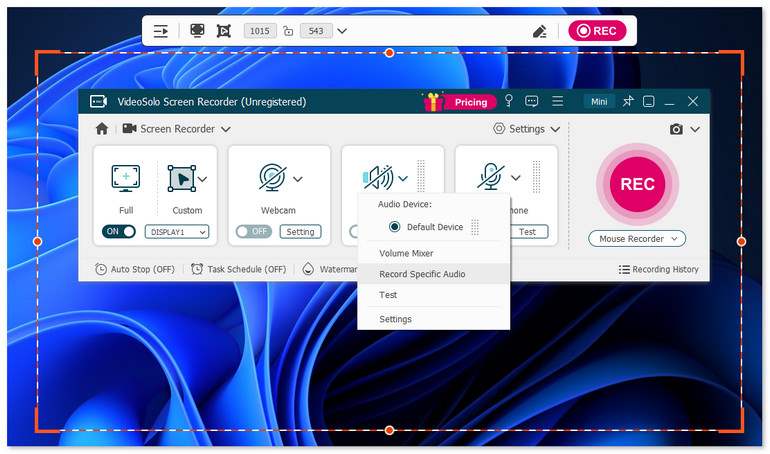
Step 2. Select Full or Custom to select what you want to record by dragging the corners or sides of the frame. Then adjust the volume bar for the system sound and microphone.
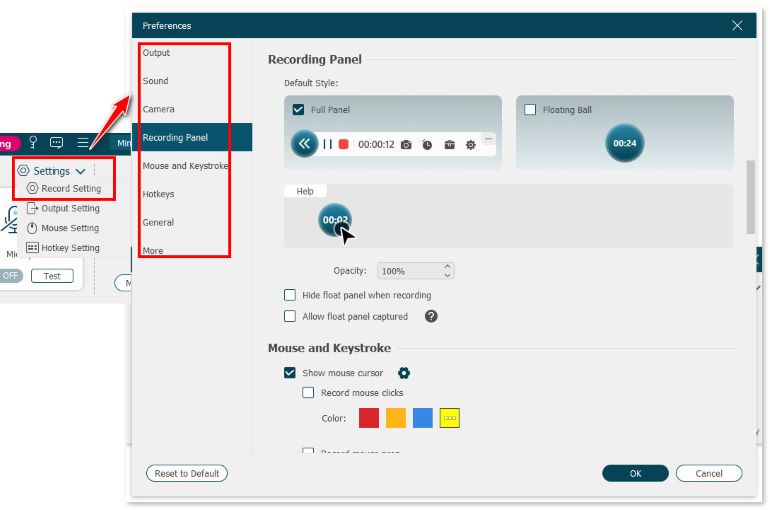
Step 3. Click Setting > Record Setting > Preferences on the interface. You can choose the video format, video quality, frame rate, and location of output files here.
Step 4. Click REC to start recording. After done, stop the process and edit your video.
Feedback
VideoSolo Screen Recorder captures all my important moments without a watermark. To record my webinar and online calls, I turned on my camera and set the webcam video position and size, then started recording. All of these functions, like setting recording length, setting task schedule, etc., simplify my work in my daily life. The only pity is that it cannot add filters, advanced polishing, and modern effects.
ScreenPal vs. Videosolo: How to Choose?
| ScreenPal | Videosolo Screen Recorder | |
|---|---|---|
| Recording Duration | 15‑min cap per video in the Free version | ✅ Unlimited |
| System Audio Recording | ❌ Not in free version; available in paid plans | ✅ |
| Recording Modes | Screen + webcam | Screen, Audio, Game, Webcam, Phone mirroring, etc. |
| Video Quality | 1080p 30fps | ✅️ 4K 60fps |
| AI Features | ✅ | ❌ |
| Real‑time Annotation | Basic drawing tools | ✅️ Add text, arrows, shapes, highlights |
| Export Formats | MP4, AVI, FLV, and a few others | ✅️Multiple formats (MP4, AVI, MOV, WMV, etc.) |
| Cloud Hosting | ✅️ | ❌️ |
| Price | Starts at $36/yr | $59.95/Lifetime |
FAQs on ScreenPal Screen Recorder
Q: Is ScreenPal safe?
A: Yes. ScreenPal is generally safe and legal to use for most users. But for streaming videos from YouTube, Twitter, Amazon Video, etc., you should make sure the content is public for recording and sharing. Please strictly obey the relevant rules of platforms.
Q: Can ScreenPal detect OBS?
A: They focus differently, and each tool has its own strengths. ScreenPal is designed for quick, easy tutorials and business demos with built‑in hosting and editing tools. OBS Studio is built for advanced gamers and streamers who need high‑performance video recording. You can choose between them according to your usage.
Q: What is the best free screen recorder program?
A: For quick, built-in solutions in daily life, Xbox Game Bar and QuickTime Player can record something without any installation. But for high-end recording, recommend you get a more powerful alternative like Videosolo Screen Recorder for a one-off capture with handy tools and user-friendly interface.
Verdict
If your workflow heavily relies on AI‑powered features and cloud storage & collaboration, ScreenPal is the better fit with a recurring subscription. However, if you value lossless output with 4K resolution and flexible multi‑format exports, Videosolo Screen Recorder clearly better meets your needs, making it the better long‑term investment for professionals and creators who value flexibility.
More readings
Capture screen activities, audio, webcam, gameplay, and mobile screens on Windows and Mac with high quality.

