



 Download Screen Recorder For FREE!
Quick Answer
If you record Snapchat messages and snaps, social and account activity like story posts on your phone, the official app will send notifications. The best solution is to use a specific screen recorder software to mirror your mobile screen activity or directly capture Snapchat Web – both ways can silence any alerts. In our test, VideoSolo Screen Recorder is the ultimate screen recorder for Snapchat.
Snapchat is focused on your privacy– snaps and chats are ephemeral and disappear after viewing. But there are many personal reasons you might want to save a memorable video, a fun story, or an important chat with friends.
Although Snapchat alerts you if you take a screenshot or screen record a conversation or story, we provide some reliable screen recorder for Snapchat that allows you to save content completely without triggering notifications.
Why Do You Always Trigger Snapchat Alerts?
Does Snapchat detect screen recorders? If you tried to screen record Snapchat but failed, you should understand how Snapchat detects screen recording is crucial:
On iOS: Apple exposes an is Captured API status. When you record, Snapchat detects this system flag and instantly sends a notification to the sender.
On Android: Android provides screen capture callbacks to apps. When Snapchat detects active recording, it either sends a chat notification or replaces the video stream with a black screen.
Airplane Mode is still effective? – NO. Some people will turn off Wi-Fi/Cellular data to record, but now Snapchat caches the event locally on your phone and automatically sends the notification after you reconnect to the internet.
Comparison of Methods to Record Snapchat
| Method | Notification | Video & Audio Quality | Risk Level | Recommended Software |
|---|---|---|---|---|
| Snapchat Web + Desktop Recorder | No (100% Safe) | Up to 4K / Crisp Internal Sound | None | VideoSolo Screen Recorder |
| Phone Mirroring to PC/Mac | No (100% Safe) | 1080p/60 FPS | None | VideoSolo (Phone Recorder Mode) |
| iOS / Android Native Recorder | Yes (Alerts Sender) | Standard Mobile | High (Guaranteed Alert) | Default OS Recorders |
| External Camera Recording | No | Poor / Shaky / Reflection | None | Secondary Phone / Camera |
Note
Please comply with Snapchat’s Terms of Service and respect other users’ privacy. Only record content you have permission to capture.
VideoSolo Screen Recorder: Ultimate Way to Record Snapchat
VideoSolo Screen Recorder is the overall screen recording app for Snapchat. Running Snapchat on Snapchat Web or mirroring your mobile screen to a computer via VideoSolo bypasses mobile notification triggers entirely. It allows you to record Snapchat videos in lossless 4K/1080p resolution with system audio safely and secretly.
Note
Snapchat does not have system-level permissions to inspect background desktop applications running on your PC or Mac.
 Why VideoSolo Is the Top Choice
- 100% Safe Capture: Operates outside mobile OS notification frameworks, ensuring zero alerts sent to contacts.
- 4K UHD & High Frame Rate: Capture Snaps and Stories in crisp 60 FPS without lag, dropping frames, or stuttering.
- Flexible Capture Area: Choose full-screen, custom fixed regions, or lock recording onto a specific browser window so background notifications don't interrupt your recording.
- Pure System Audio Recording: Captures clear internal audio from Snapchat without picking up background room noise or echo from your computer microphone.
- Built-in Post-Editing: Trim, crop, or highlight key sections of the video immediately after recording before saving.
How to Record Snapchat Using VideoSolo?
Way 1. Record Snapchat Web
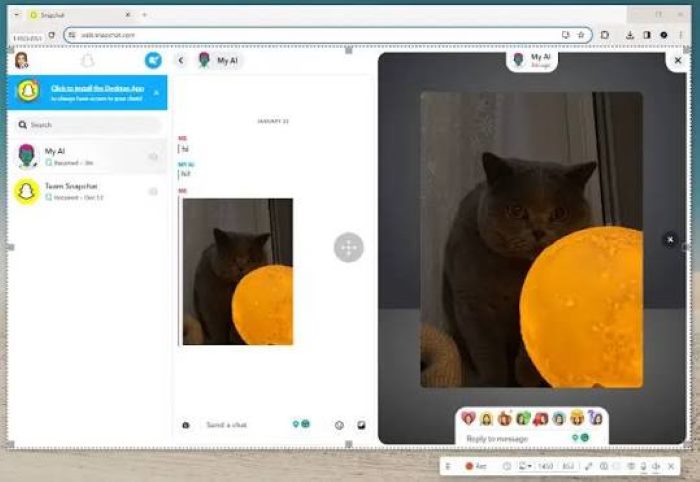
Step 1. Navigate to Snapchat on Google Chrome, Edge, or Safari, and find what you want to record.
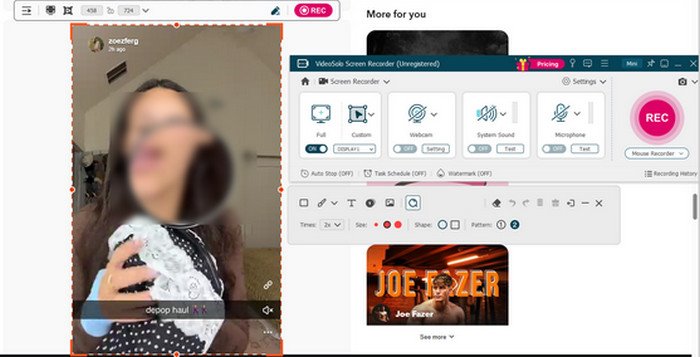
Step 2. In VideoSolo, click Screen Recorder Mode, select Custom capture, and drag the dotted frame to fit the Snapchat window (or choose Window mode to lock onto the Chrome browser).
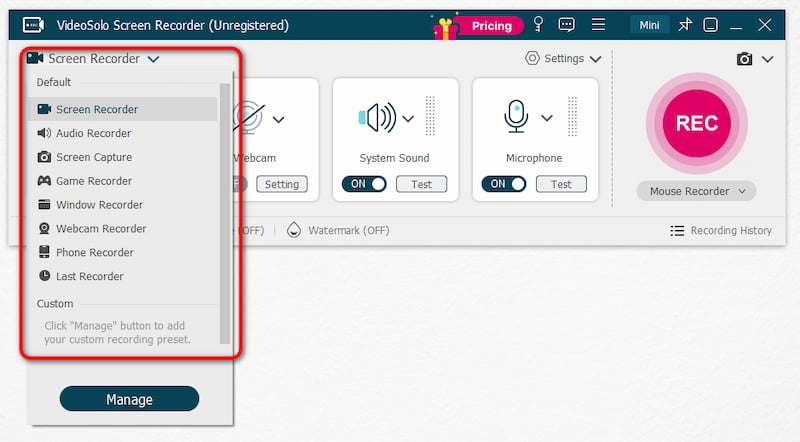
Step 3. Turn System Sound ON and turn Microphone OFF (unless you are recording a live two-way Snapchat video call and want your voice included).
Step 4. Click the red REC button or press the hotkey to record a Snapchat story, video, or chat Snap.
Step 5. Click the red Stop button. Then you can use the built-in editor to polish the footage and save your video in MP4, or your format of choice.
Way 2. Record Snapchat on Phone
If you prefer navigating Snapchat directly on your mobile device (iPhone or Android), VideoSolo provides a powerful Phone Recorder feature. This projects your mobile screen onto your PC or Mac wirelessly using AirPlay or Screen Cast. Because the phone itself isn't running a local recording process, Snapchat cannot detect the screen recording event – so you can perform the recording quietly.
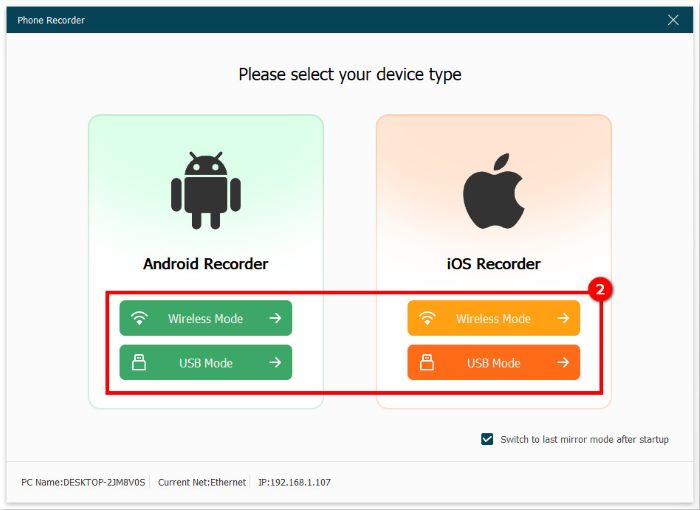
Step 1. Open VideoSolo Screen Recorder on your computer and select Phone Recorder.
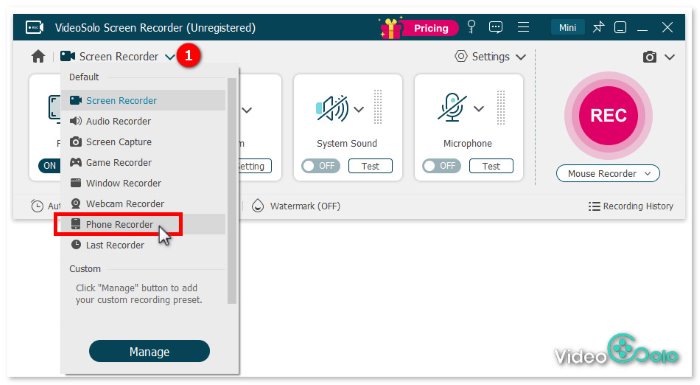
Step 2. Choose your operating system (iOS Recorder or Android Recorder). Connect your smartphone and computer to the same Wi-Fi network.
Step 3. Open the Control Center on your iPhone (or Cast settings on Android) and tap Screen Mirroring, selecting VideoSolo. Your smartphone screen will immediately display on your computer monitor.
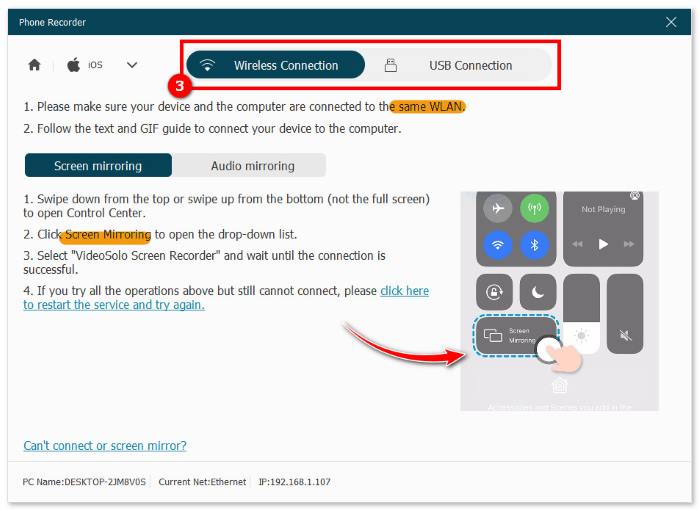
Step 4. Click Record on VideoSolo on your computer, then open Snapchat on your phone to play the desired media.
User Review
Rohan Mathawan, a Content Editor at Techstory Media, reported, “The trial edition only allows you to store three minutes of each recorded video (there is no time limit for recording). If you want an easy-to-use and powerful screen recorder, VideoSolo Screen Recorder is worth a shot. Setting recording length, task scheduling, modifying recording presets, and other complex capabilities are available.”
3 Alternative Desktop Screen Recorders for Snapchat
While VideoSolo remains our top recommendation for versatility and ease of use, here is how other popular screen recorder options perform:
1. Bandicam
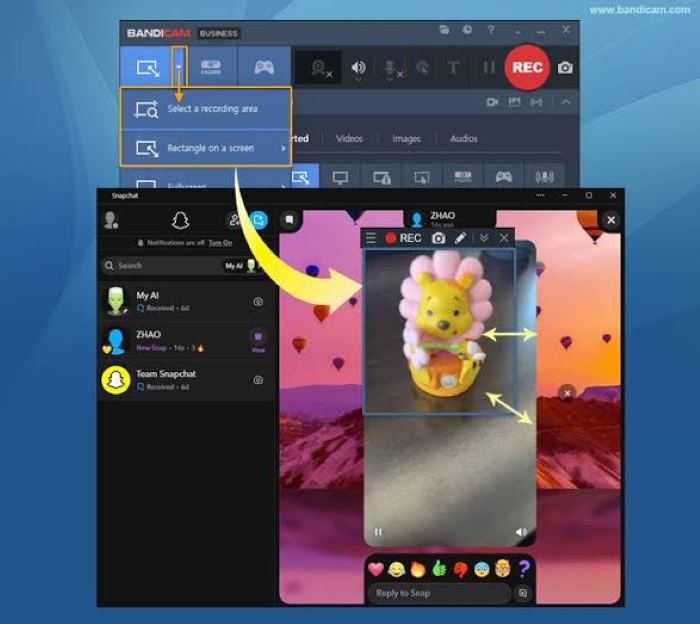
Bandicam is a well-known screen recorder for Windows users. Actually, it is welcome news for Apple device owners from last year. It is all-round for gamers, online instructors, enterprise teams, and regular content creators alike. With its compression technology, your computer uses low CPU usage while producing relatively compact video files. For more details, you can refer to the article: [Deep Review] Is the Bandicam Screen Recorder Worth It?
 pros
pros
- Capture online video and audio, online meetings, as well as call snapshots.
- Grab a selected window region even when that window is hidden behind other apps.
- Annotate your screen in real time with pens, shapes, and arrow markers.
 Cons
Cons
- Mobile screen mirroring setup requires third-party plugins.
- All recordings in the free trial add a brand watermark.
- Only basic video editing tools.
2. Movavi Screen Recorder
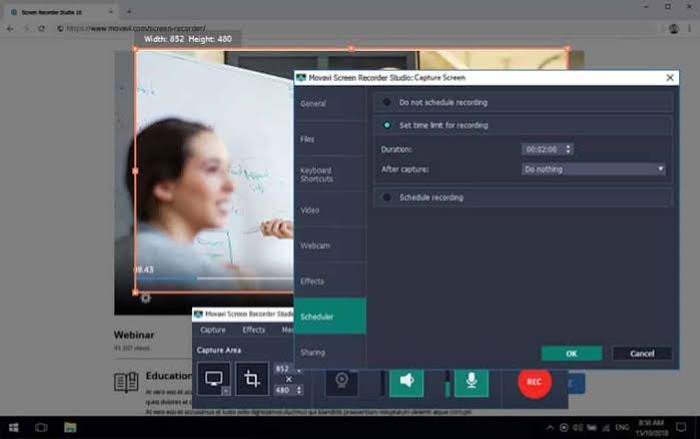
Movavi Screen Recorder is available for both Windows and macOS. It is well-suited for capturing Snapchat content via Snapchat Web, phone screen mirroring, or Android emulators. You can select a custom capture region to frame only the Snapchat window to record Snaps, Stories, and chat videos with system audio from Snapchat. But some people have reported that when using iOS AirPlay mirroring, modern Snapchat versions may detect casting and show a black screen or trigger notifications.
pros
- Preserve the original sound and video quality of Snapchat videos.
- Bypass Snapchat’s mobile screen-recording detection.
- One-click screenshot capture for Snap images.
Cons
- Includes a watermark on the exported video in the free trial.
- Can’t bypass Snapchat’s built-in anti-recording protections on mobile directly.
3. Icecream Screen Recorder
Icecream Screen Recorder is an intuitive tool that is ideal for capturing Snapchat content both through Snapchat Web and mobile screen mirroring, like VideoSolo Screen Recorder. Although it lets you capture Snaps, Stories, and chat videos, its free edition has strict time and format limits. In contrast, VideoSolo provides more optional formats for outputting and sharing offline.
pros
- Simple interface suited for basic screen capture tasks.
- Supports scheduled recording for Snapchat live content.
- Take high-quality screenshots for saving Snap content.
Cons
- Limited advanced features.
- The free version limits recording time to 5 minutes.
- It may encounter scaling issues on high-resolution 4K displays.
- Exports only in WebM format in the free version.
Comparison: Best Tools for Screen Recording on Snapchat
| Software | VideoSolo | Bandicam | Movavi | Icecream |
|---|---|---|---|---|
| Rating | 4.7/5 ⭐⭐⭐⭐ | 4.4/5 ⭐⭐⭐⭐ | 4.4/5 ⭐⭐⭐⭐ | 3.9/5 ⭐⭐⭐ |
| Free Trial Limit | 3-minute recording can be saved (no limit on recording time) | 10-minute recording; watermark | watermark; audio-only recording capped at 3 minutes | 5-minute recording; watermark; WEBM format |
| Recording Quality | 4K/60FPS | 4K+/60FPS+ | 4K/60FPS | 1080p/30fps |
| Scheduled Recording | ✅️ | ❌️ | ✅️ | ✅️ |
| Editing Video | Real-time annotation, advanced trimmer, video compressor/merger/converter | Real-time drawing and post-trimming | ️Requires a separate app for advanced editing | Basic real-time drawing |
| Output Formats | 16+: MP4, AVI, MOV, WMV, MP3, WMA, etc. | MP4/AVI/MOV/MKV/GIF/MP3 | MP4, AVI, MOV MP3, and GIF | WEBM (free) |
| OS | Windows 11/10/8/8.1/7/XP, Mac OS X 10.12 or above (including macOS 26) | Windows 11/10/8/7 64-bit, macOS 13.3 (Ventura) or later | Windows 10/11 macOS 12.0 or higher | Windows 7, 8, 10, and 11, macOS 10.9 or later |
| Pricing | $14.95/Month $49.95/Year $59.95/Lifetime | $9.99~$95.92 | $44.95/Lifetime | $29.95/yr, $59.95/Lifetime |
FAQs on Snapchat Screen Recording
Does Snapchat notify the user when you screen record on a computer?
No. Snapchat Web running in a web browser cannot detect background desktop screen recorders like VideoSolo Screen Recorder. Desktop operating systems do not trigger mobile-style screen capture API events.
Can you screen record Snapchat video calls without them knowing?
Yes. By using VideoSolo Screen Recorder on Snapchat Web or through Phone Mirroring, you can capture both the video stream and the clear internal audio of a Snapchat call without sending any system notification to the other call participant.
Is using a screen recorder for Snapchat legal and safe?
Recording publicly shared Snapchat Stories or saving media for personal archiving is legal. However, saving private Snaps or personal chat media without mutual consent may violate Snapchat’s Terms of Service and user trust. Always respect creators' and friends' privacy when using screen recorders.
Final Verdict
While Snapchat's mobile app enforces strict notification policies, desktop screen recorders for Snapchat remain the safest, highest-quality solution. By leveraging VideoSolo Screen Recorder alongside Snapchat Web or its wireless Phone Mirroring feature, you can capture 4K Snapchat videos with crisp internal audio, completely free of notification risks.
More Readings
Capture screen activities, audio, webcam, gameplay, and mobile screens on Windows and Mac with high quality.

